Microsoft 365 consulting & support · Hamburg Microsoft 365 setup, migration and device management.
I set up Microsoft 365, migrate email and files, and manage Windows and Apple devices. We start with the way your team works and agree on the setup, access permissions and support you need.

Losing track of Microsoft 365
New accounts, extra teams and shared files pile up quickly in everyday work. Before long, nobody is quite sure who still has access, which licences are really needed and whether the security features you already have are actually set up. Typical examples: accounts of former staff, permanent admin rights, or files shared with “anyone with the link”.
I review these points with your IT team or carry out the assessment for you. You then know what is urgent and what can wait.
Planning accounts, devices and collaboration together
Together we decide who can access which data, how new devices are set up and where your team stores files. I document the configuration and processes so your IT team can carry on with them. This is also the groundwork for Copilot and automation. If you want, I take over day-to-day operations as part of ongoing IT support.
What I take on for Microsoft 365.
Microsoft 365 does not automatically mean Windows. I support Windows and Apple environments, including companies with more than 150 staff working on Macs. Which device management fits depends on your requirements and the licences you already have.
-

Tenant and licence audit
A review of your Microsoft 365 tenant covering security, configuration and licences: what is missing, what is paid for but not switched on, and which measures make sense in which order. You then find the results in your customer portal.
-

Microsoft 365 structure and rules
Policies, naming conventions, storage locations and access permissions for Teams, SharePoint and OneDrive.
-

User accounts and access permissions
Entra ID with multi-factor authentication, Conditional Access, a role model and protection for privileged accounts.
-

Device management
Managing, securing and provisioning Windows and macOS devices centrally and to a standard, with Microsoft Intune and, for Apple devices, through Apple Business Manager: compliance policies, FileVault and BitLocker, software deployment, device configuration and automated onboarding. iPhones and Android devices run in the same system. Building device management from scratch or migrating from another MDM.
-

Migrating mailboxes and files
Moving from Exchange, IMAP, Google Workspace or file servers to Exchange Online and SharePoint, plus tenant-to-tenant migrations after acquisitions or a change of company name.
-

Security and compliance
Microsoft Defender, technical data protection and compliance settings, retention policies and backup for Microsoft 365.
-

Training for your team
Briefings for staff and in-house IT so new structures actually take hold day to day.
-

Preparing for Copilot
Preparing permissions, data quality and governance so Microsoft 365 Copilot can be introduced safely.
How secure is your Microsoft 365 environment, really?
I review your Microsoft 365 environment against around 500 checks. The free short report, as a PDF, shows where action is needed and what to tackle first.
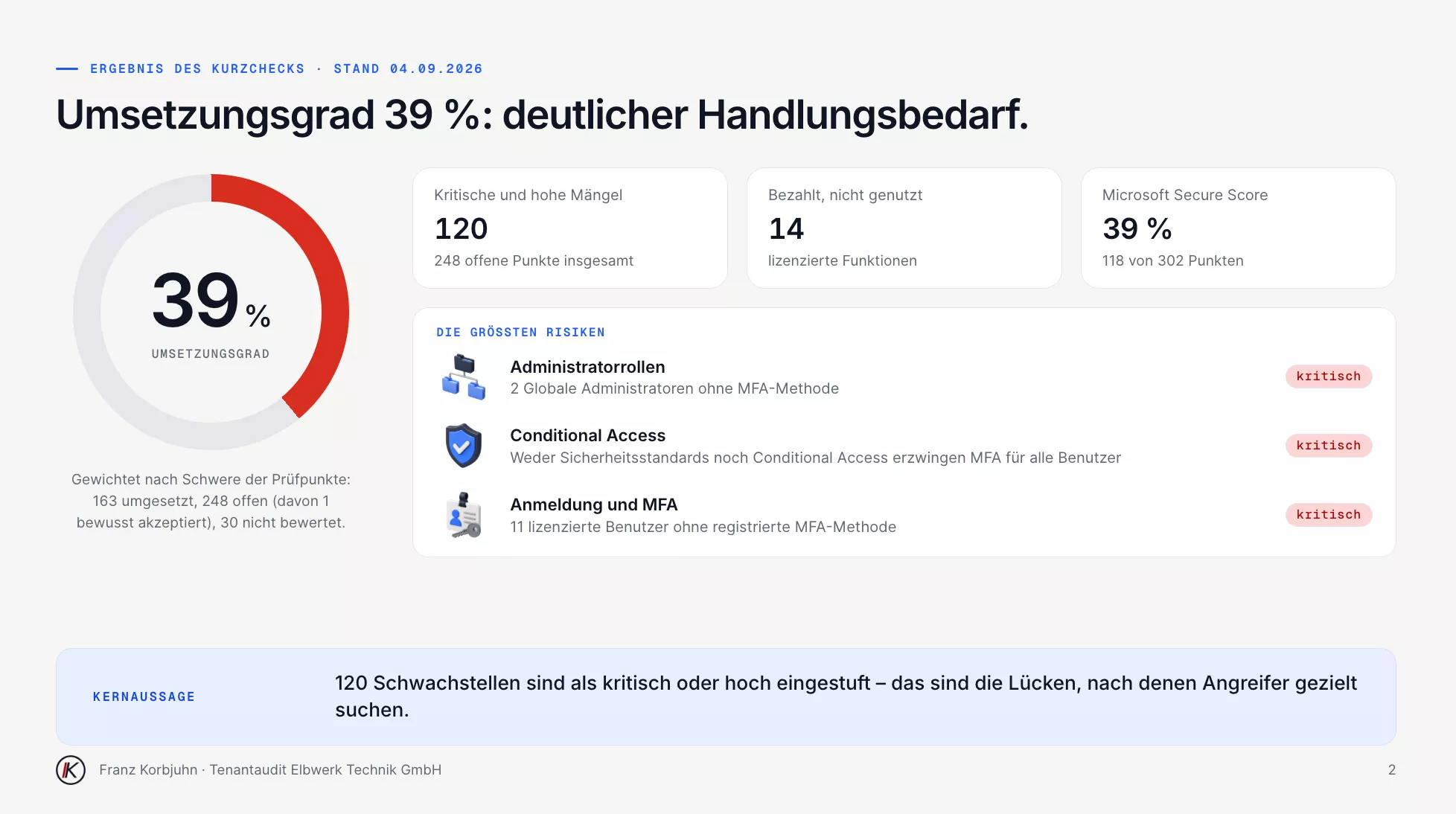
Short report, page 2 · sample data, in German
What I look at first
I start with sign-in protection, admin rights and emergency access accounts. What gets implemented first depends on the findings. I prepare and test additional access rules (Conditional Access) before they take effect. For features such as Privileged Identity Management we also check the licensing: PIM needs Entra ID P2 or Entra ID Governance, which Business Premium does not include.
When migrating from a file server, I do not copy the folder structure one to one. SharePoint works with few levels and several document libraries; I set permissions per library before the data moves. Whether mailboxes move in waves or on a single date depends on size and starting point. I let staff know about changes in advance and plan time to walk them through the new ways of working.
Choosing the right setup for your company
For many small and mid-sized companies, Business Premium is a sensible starting point when devices need managing and additional security features are required. I compare your requirements with your existing licences and add-on products. That shows whether a switch, individual add-on licences or your current combination fits best. Which Business Premium features often go unused is covered in the article Business Premium: paid for, but not switched on.
For large CAD and media files we look at which storage suits the applications you use. Before introducing Copilot, we review permissions. And when Teams and SharePoint change, walking your team through it is part of the plan.
The building blocks I work with.
These are the building blocks I use, depending on the requirement.
- Entra ID
- Central identities, roles and single sign-on for Microsoft 365 and connected applications.
- Conditional Access
- Controlling access by user, device, location and risk.
- Intune
- Device management for Windows, macOS, iOS and Android: configuration, compliance, app deployment, BitLocker and FileVault.
- Exchange Online
- Mailboxes, rules, archiving and protection against spam and phishing.
- SharePoint, Teams, OneDrive
- File storage and collaboration with governance rules and permissions you can follow.
- Microsoft Defender
- Protection for devices, email and identities within Microsoft 365.
- Privileged Identity Management
- Time-limited admin rights, with justification and audit trail. Requires an add-on licence such as Entra ID P2 for the administrators.
How a rollout or migration runs.
-
01
Analysis
Tenant review, licences, requirements and goals.
-
02
Design
An agreed plan for accounts, devices, rules and migration, with sequence and effort.
-
03
Delivery
A gradual rollout and migration during normal operation: security first, then structure.
-
04
Operation
Documentation, training and, if you want it, an ongoing managed service.
Questions about Microsoft 365.
Have a different question? Just write to me.
Yes. I review the current setup and agree with you which tasks I take on: ongoing support, a migration, device management or specific security measures. The starting point is usually an audit of accounts, admin rights, email protection, sharing, devices and licences. What this can look like is shown by a security concept for Microsoft 365 from a client project.
For many small and mid-sized companies Business Premium is a sensible starting point, because device management and important security features are already included. Which licence fits, however, depends on what you actually need. I do not recommend the larger licence automatically just because it can do more.
With Intune and Apple Business Manager, or with a specialist Apple solution such as Mosyle or Jamf. What matters is the settings you need, software deployment and the way your IT team works. I also handle moves between existing management systems. I have summarised the differences in a comparison of Intune, Mosyle, Jamf and Iru.
Nothing is changed. For the review I use access with read-only permissions that is closed again directly after the data has been retrieved. The access remains traceable in your tenant. If you want to keep an eye on things continuously, you receive a monthly report as part of IT support.
What would you like to improve in Microsoft 365?
Whether it’s licences, security settings or a planned migration: tell me where you stand, and we’ll work out what support makes sense. For a first look at security, there is also the free Microsoft 365 check.