IT security for companies · Hamburg IT security for accounts, devices and business data.
I review your existing setup and help you address the findings. This can include sign-in policies, administrative access, device protection and backups. We agree on priorities and the work to be carried out, taking account of what your clients or cyber insurer require.
Which safeguards are already working?
Antivirus software and regular backups are important foundations. What counts is how they are set up: who deals with alerts? Are admin rights limited? Has anyone ever tested a restore?
I look at what is in place and who is responsible for what. You get an overview of open issues and can decide where to spend your budget first.
What a security concept should achieve
The aim is an environment that makes attacks harder and is prepared for an incident: protected accounts and devices, segmented networks with firewall and VPN, secured email and backups you can actually restore from. Add defined responsibilities and an incident plan for when protection is not enough. What that looks like in Microsoft 365 is shown by a security concept for an engineering firm.
The areas I review and look after.
-

Risk analysis and security concept
Vulnerability analysis, a review of network, permissions and configurations, and a prioritised action plan as the basis for budget and sequence. For Microsoft 365 I use an automated tenant audit and check again after implementation whether the measures are working.
-

Identity and access protection
Multi-factor authentication, Conditional Access, permissions only as far as needed (least privilege), protection for privileged accounts and a password manager.
-
Endpoint protection and MDR
Endpoint protection with detection and response (EDR/XDR) and device encryption. If you want security alerts assessed by an analyst team as well, I include a suitable MDR service.
-

Network security
Next-generation firewall, segmentation into security zones, secure VPN and zero-trust principles for access from outside.
-

Email security
Protection against phishing, spam and malware, SPF, DKIM and DMARC, encryption and archiving.
-

Vulnerability and patch management
Regular, controlled updates for operating systems, applications and firmware, with monitoring of open vulnerabilities.
-
Backup and disaster recovery
Backup following the 3-2-1 rule including Microsoft 365, optionally with a copy on my servers in German data centres, separate from your network. Plus restore tests, which I recommend quarterly, and defined recovery times.
-

Security awareness
Training and phishing simulations so staff recognise attacks and react correctly.
-

Incident plan and response
Who does what when something happens: contacts, locking accounts, recovery, communication and reporting obligations.
How secure is your Microsoft 365 environment, really?
I review your Microsoft 365 environment against around 500 checks. The free short report, as a PDF, shows where action is needed and what to tackle first.
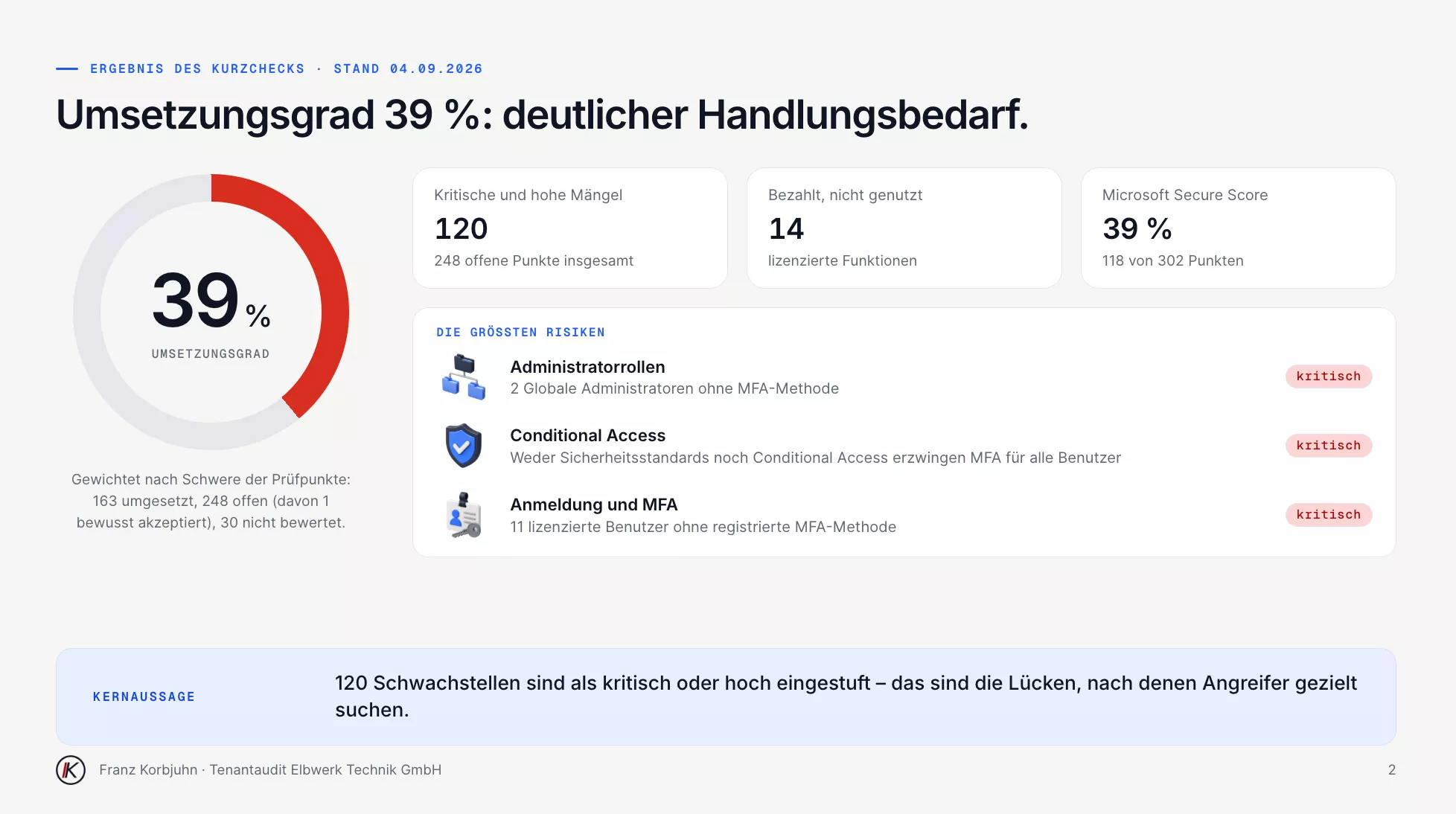
Short report, page 2 · sample data, in German
My order of work
I often start by protecting sign-ins and admin access, on-premises and in the cloud. I also look at backups, endpoint protection, the network and how suspicious messages are handled. The order depends on which gaps matter most in your environment. I choose a password manager to suit the company, for example Proton Pass, NordPass, RoboForm or 1Password.
For endpoint protection I am not tied to any vendor. Where Business Premium is in place, I usually recommend Microsoft Defender for Business: it is already included and works closely with Intune and Conditional Access. Where another product fits the environment better or the client prefers it, I use that, including with MDR. Where the licence does not include Defender for Office 365, I usually add Hornetsecurity for email protection.
A ransomware case
When a company with around 60 staff was hit by ransomware, its IT service provider brought me in. An intact offline backup made the recovery possible, and the company was working again after 48 hours. I describe what happened, and the limits of this single case, in the article Ransomware attack: working again after 48 hours.
My clients include operators of critical infrastructure. I support certification to ISO 27001 or TISAX. Penetration tests and forensics are handled by specialist partners I bring into the project.
Security solutions I use.
Which components make sense depends on risk, environment and how much protection is needed.
- Endpoint protection by concept
- Sophos, WatchGuard or Bitdefender where they fit the concept better or are requested, optionally with MDR: an analyst team assesses incidents around the clock and steps in.
- Sophos Firewall
- Next-generation firewall with segmentation, VPN and Synchronized Security with endpoint protection.
- Microsoft Defender & Conditional Access
- Protection for identities, devices and email within Microsoft 365, with access rules by user, device and risk.
- Hornetsecurity
- Email security, backup for Microsoft 365 and security awareness training with phishing simulations.
- Bitdefender
- Endpoint protection as an alternative, depending on the environment and requirements.
- AvePoint
- Backup and governance for Microsoft 365, SharePoint and Teams.
- Proxmox Backup Server
- Backup of virtual servers with verification and targeted restore.
How a security concept comes together.
-
01
Analysis
Risk analysis and inventory: what is there, what is active, what is missing?
-
02
Prioritise
An action plan ordered by risk and effort, matched to your budget and to what insurers or clients require.
-
03
Build
A gradual rollout, agreed with your staff, so security works in everyday use.
-
04
Operate
Monitoring, updates, reporting and regular review, because both threats and your environment keep changing.
Questions about IT security.
Have a different question? Just write to me.
That depends on the insurer and the policy. I go through the technical requirements with you, document what is already in place and show which measures are still missing. What counts are the documents from your insurer.
Smaller companies may also have to meet IT security requirements set by their clients. I help with the technical assessment and implementation. Whether your company itself falls under the legal obligations is a question for specialist advisers or lawyers.
MFA is the most important first step, but modern phishing techniques get around simple methods. Conditional Access, devices managed with Intune, email protection and awareness belong with it, so the measures work together.
The key questions are who assesses security alerts and how quickly someone needs to respond. I discuss with you whether an external analyst service fits your risks and internal resources. Without an MDR service, you should at least have ongoing monitoring with alerting.
Do you know where your IT needs attention?
If you want to check your security or need to meet specific requirements, get in touch. We agree the scope of an assessment and the next steps.