Microsoft 365 security audit · Hamburg How secure is your Microsoft 365 environment, really?
In every tenant I have reviewed so far, fewer than half of the security-relevant settings were in place at the first check. In the Microsoft 365 security audit I review your tenant, meaning your Microsoft 365 environment, against around 500 checks across twelve areas: security, configuration and licensing, read-only. The first check is free: a short PDF report on the current implementation status and the most significant findings.
Which settings should you review first?
A Microsoft 365 licence says little about how your environment is configured. Many protection features are included but not set up for your company. What matters is sign-in, admin rights, device protection and sharing, because most attackers now get in with stolen passwords. Sources: Bitkom Wirtschaftsschutz 2026, Microsoft Digital Defense Report 2025, my own audits.
- of companies in Germany affected by data theft, espionage or sabotage, or suspect they were (Bitkom 2026)
- 96 % of companies in Germany affected by data theft, espionage or sabotage, or suspect they were (Bitkom 2026)
- of identity attacks are password attacks, MFA stops over 99 % (Microsoft 2025)
- 97 % of identity attacks are password attacks, MFA stops over 99 % (Microsoft 2025)
- of security settings in place. So far in every tenant I have reviewed.
- < 50 % of security settings in place. So far in every tenant I have reviewed.
What you hold in your hands after the Microsoft 365 security audit.
The full audit is delivered in the customer portal: every finding with evidence from your tenant, recommended measures and effort planning. A basis for decisions by management and IT.
Implementation status per area
Twelve areas with a traffic light and a percentage: the share of applicable checks that are implemented, weighted by severity. Not a certification, but your starting point.
Every finding in plain language
What the risk is, what to do and where in the admin center, with evidence from your tenant.
Action plan with effort
Prioritised into immediate, short term and medium term, with estimated effort. You decide what gets implemented.
Progress after implementation
A second review shows in black and white what has improved, per area and per measure.
Thoroughly checked. Clearly explained.
The review is based on recognised frameworks and recommendations: the CIS Microsoft 365 Foundations Benchmark, the SCuBA baselines of the US agency CISA, Microsoft Secure Score, the Intune security baselines and Microsoft's Zero Trust model. The audit is not a certification. Which checks apply depends on your licensing.
- Checks
- ~500 Checks
- Areas
- 12 Areas
- Frameworks
- 5 Frameworks
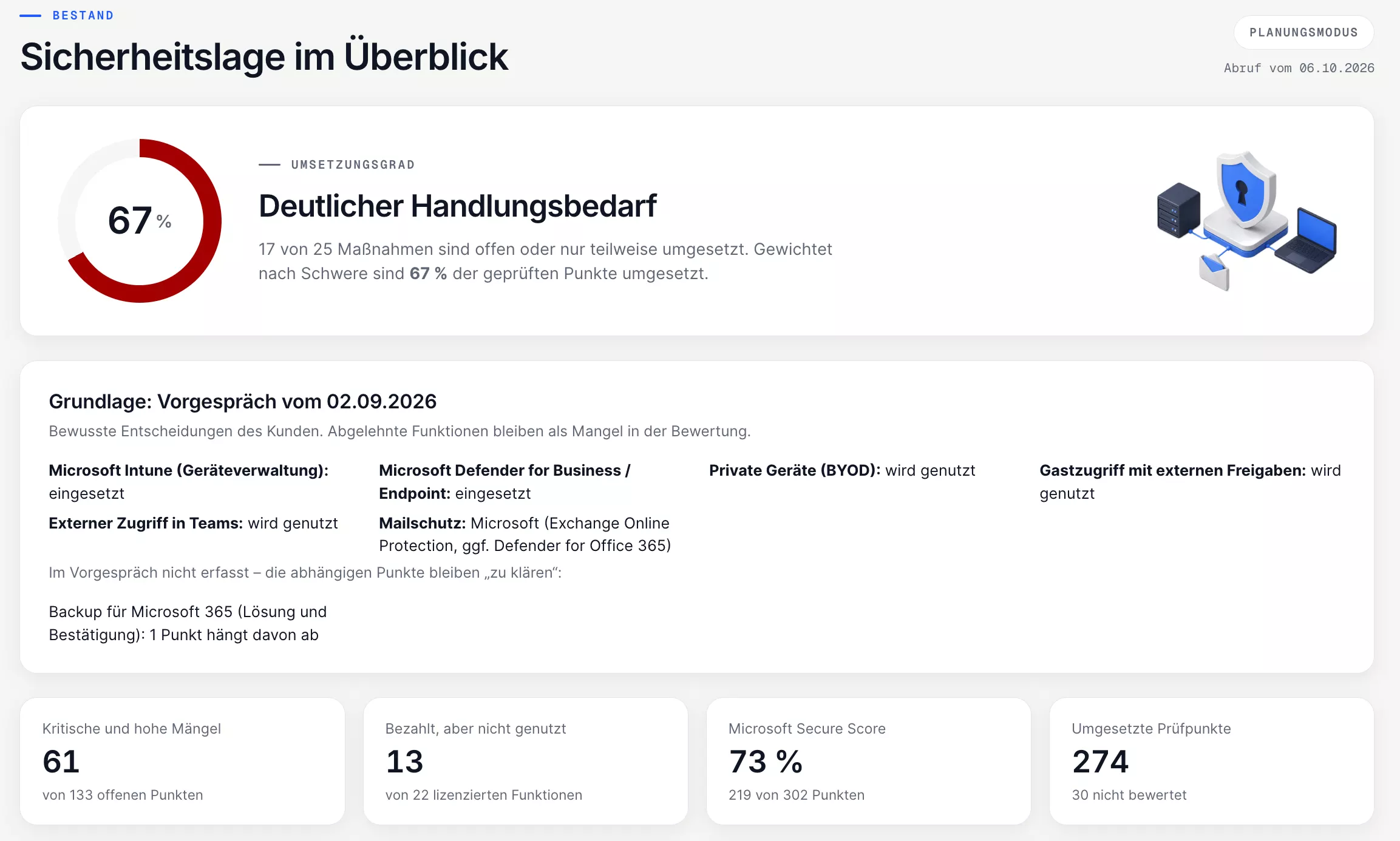
Security overview · sample data, tool in German
Four steps to a first assessment.
-
01
Request
Send me a short message. I will send you the link to the short order.
-
02
Short order
You receive the short order by email and sign it online. It covers the access and how the data from the check is handled.
-
03
Approval
The short order lists every permission required. A global administrator then grants read-only access.
-
04
Short report
Within 24 hours* you receive the assessment as a PDF. *From the moment your IT grants access.
What the short report shows.
A short PDF report: implementation status, the most significant findings and a first set of priorities. It does not include solutions or effort estimates; those belong to the full audit. The check is free and does not commit you to anything further.
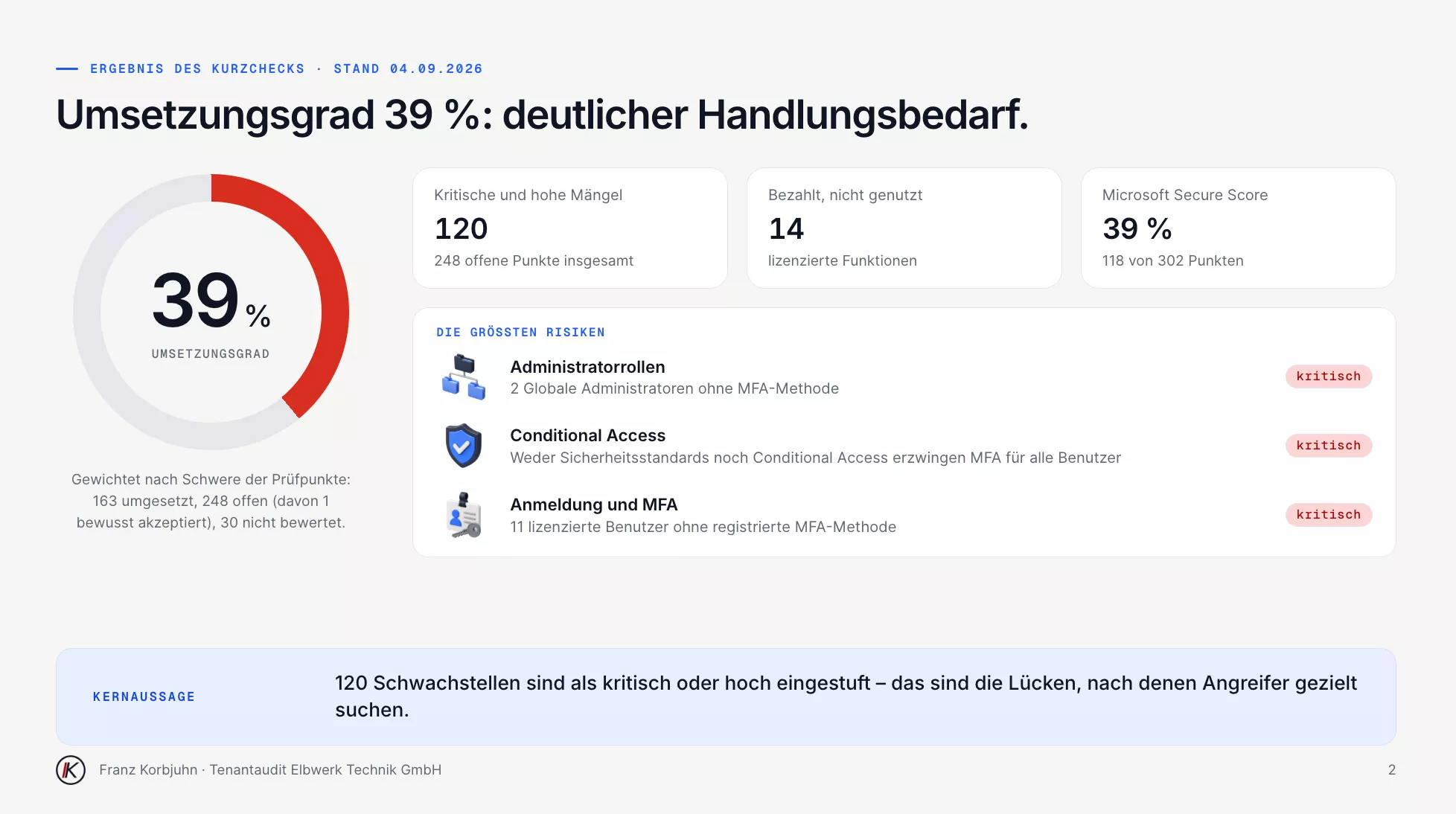
Short report, page 2 · sample data, in German
Twelve areas, one overall picture.
Every finding is rated by severity and explained in plain language: what the risk is and what fixing it means for your company.
Sign-in and MFA
MFA for all accounts, legacy sign-in methods, password rules and self-service.
Conditional Access
Policies, exclusions, emergency access accounts and session lifetime on unmanaged devices.
Admin roles
Number of global administrators, standing privileges and Privileged Identity Management.
Exchange and email protection
SPF, DKIM and DMARC, external forwarding, protection against phishing and malware.
SharePoint, OneDrive and Purview
External sharing, guest access, retention and sensitivity labels.
Teams
Guests, external communication and meeting settings.
Devices (Intune)
Compliance, encryption, updates and protection of company data in apps.
Microsoft Defender
Endpoint protection, attack surface reduction rules and threat detection.
Apps and consent
Application permissions, user consent and expiring secrets.
AI and Copilot
Copilot Studio agents, their sharing and access to company data.
Organisation settings
Audit log, self-service purchases and tenant-wide defaults.
Backup
Backup of mailboxes, SharePoint and OneDrive beyond the recycle bin.
What a finding looks like.
For every open item: the goal, the risk in plain language, the recommendation, the click path in the admin center and the evidence from your tenant. Your IT or a service provider can work with it directly.
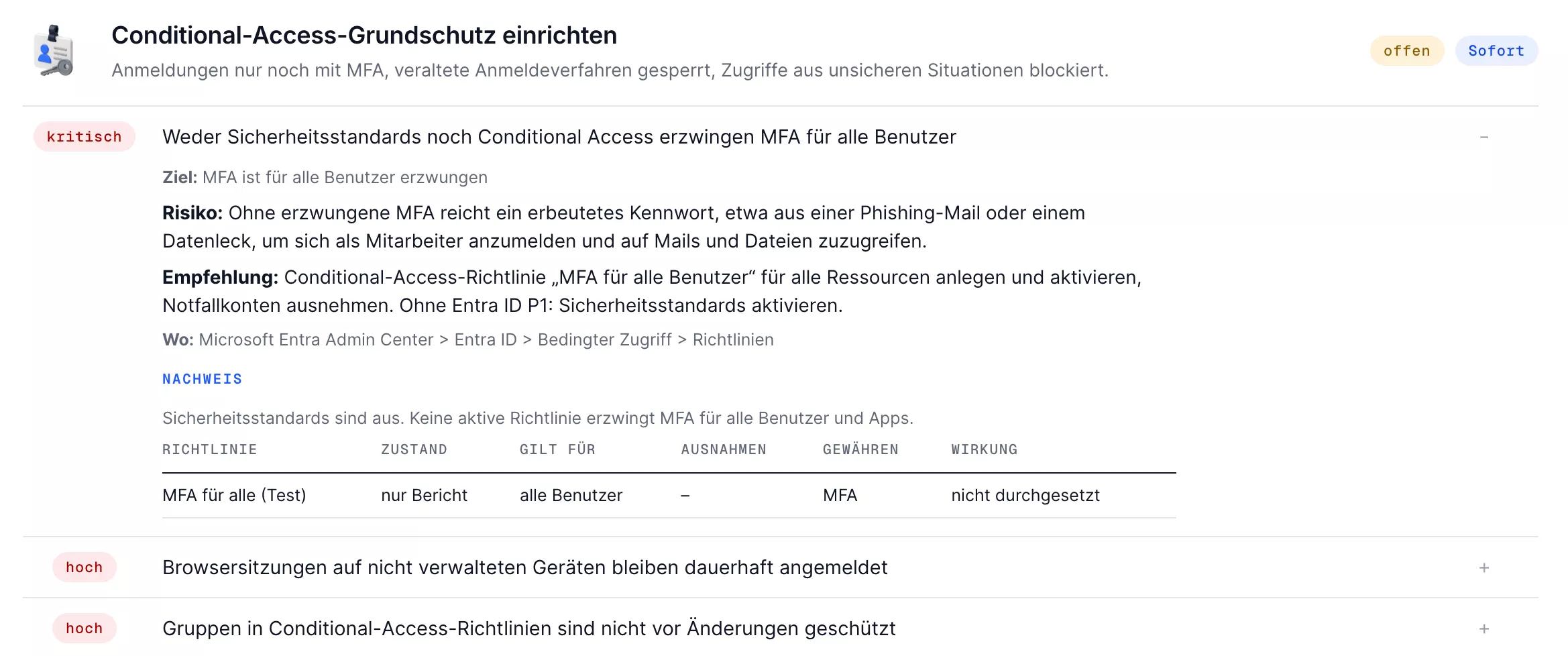
Finding in the Conditional Access area · sample data, in German
From findings to re-check.
-
01
Initial call
We go through your environment, your questions and the scope of the audit.
-
02
Review
I retrieve your tenant settings, with read-only access.
-
03
Assessment
We go through the results together, with your company in mind.
-
04
Action plan
Every measure with effort and sequence. You decide what gets implemented.
-
05
Implementation (agreed separately)
You decide who carries out the work: your IT, me or both together. I announce noticeable changes in advance.
-
06
Re-check
A second review shows which findings have been resolved.
From findings to a secured tenant. Measurably.
After implementation I review the tenant again. The progress view shows per area and per measure what has improved and what is still open. The figures are a sample analysis (demo client), not a client reference: a demo tenant with 48 users, five weeks after the first check.
- implementation status at the first check
- 39 % implementation status at the first check
- after the first implementation phase
- 67 % after the first implementation phase
- checks resolved
- 111 checks resolved
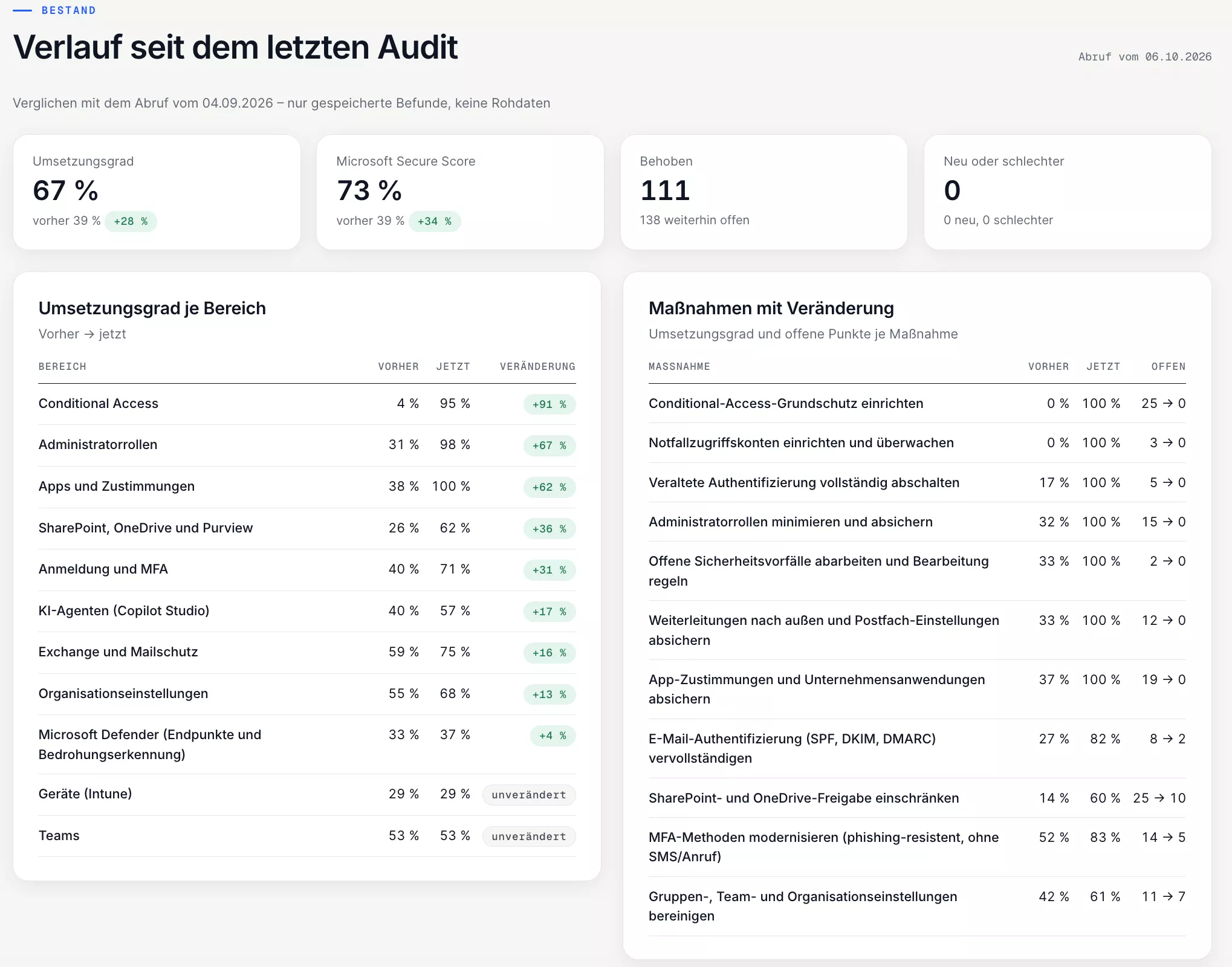
Before and after · sample analysis (demo client), not a client reference, in German
What happens in your tenant, and what does not.
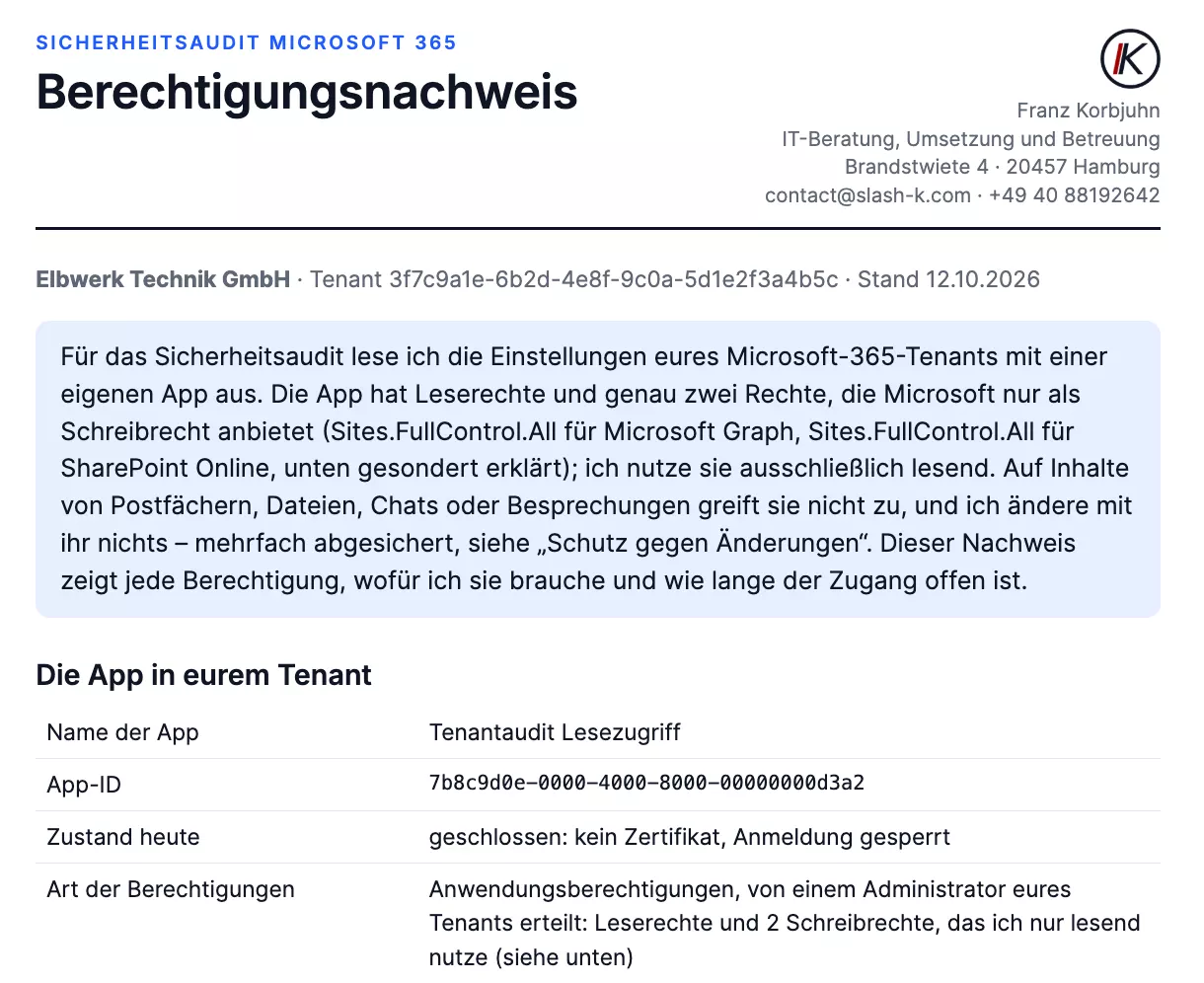
An audit needs trust. That is why every access is limited, documented and verifiable by your IT.
-
01
Read-only permissions
The audit app only receives read permissions. It does not access the contents of mailboxes, files or chats.
-
02
Time-limited access
Your administrator grants access. Once the work is complete I remove the certificate and the role and block the app. How long access stays open is set out in advance in the permission statement.
-
03
Permission statement
It comes with the order, so you have it before you grant access: every permission, what I need it for and how long access stays open.
-
04
Access log and write protection
Every step is logged. A multi-layered technical write protection prevents any change in the tenant.
You see every permission before I use it.
The permission statement comes with the order and lists every right of the audit app, its purpose and how long access stays open. Once the work is complete you receive proof that access has ended: for the audit, the access log recording every step; for the free check, the confirmation of deletion.
Permission statement · sample data, in German
First, see for free where your tenant stands.
A short order online, approval by your IT, a short report as a PDF within 24 hours of your IT granting access.
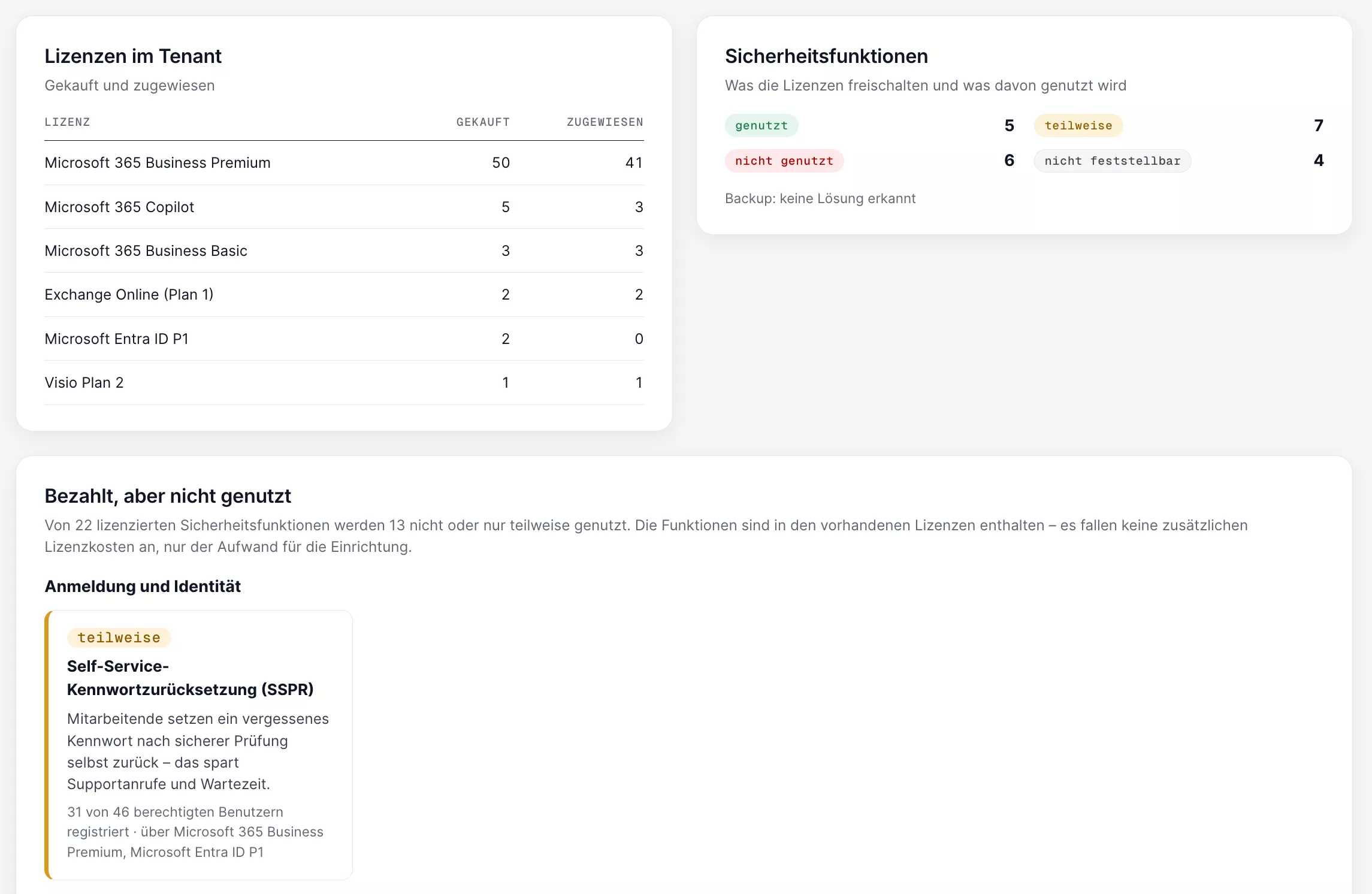
Paid for, but not used.
In the full audit I also analyse your licences: which security features you pay for but have not switched on, where licences sit unused and whether term and billing model fit. These measures may be covered by your existing licences. Configuration and review work are agreed separately.
Licences and security features · sample data, in German
Questions about the audit.
Have a different question? Just write to me.
A short PDF report on the implementation status and the most significant findings in your Microsoft 365 environment. Detailed solutions and effort estimates are part of the separately commissioned full audit. The check costs nothing; whether you then commission the audit is entirely up to you.
A short order you sign online and approval from your IT: a global administrator grants read-only access. The permission statement sets out beforehand which permissions are involved.
No. I use access with read-only permissions, and several layers of technical write protection prevent changes. Only the audit app itself is created, and I remove the access once the work is complete. The access remains traceable in your tenant.
No. The audit checks the settings of your Microsoft 365 tenant. Penetration tests are carried out by specialist partners I bring into the project when needed.
Yes. The review covers what your licences include. The licence analysis also shows whether a switch makes sense and what protection it would add.
If you want the status reviewed regularly, we can agree this as part of IT support. You then receive a monthly security report in the customer portal, and changes in the tenant are noticed early.
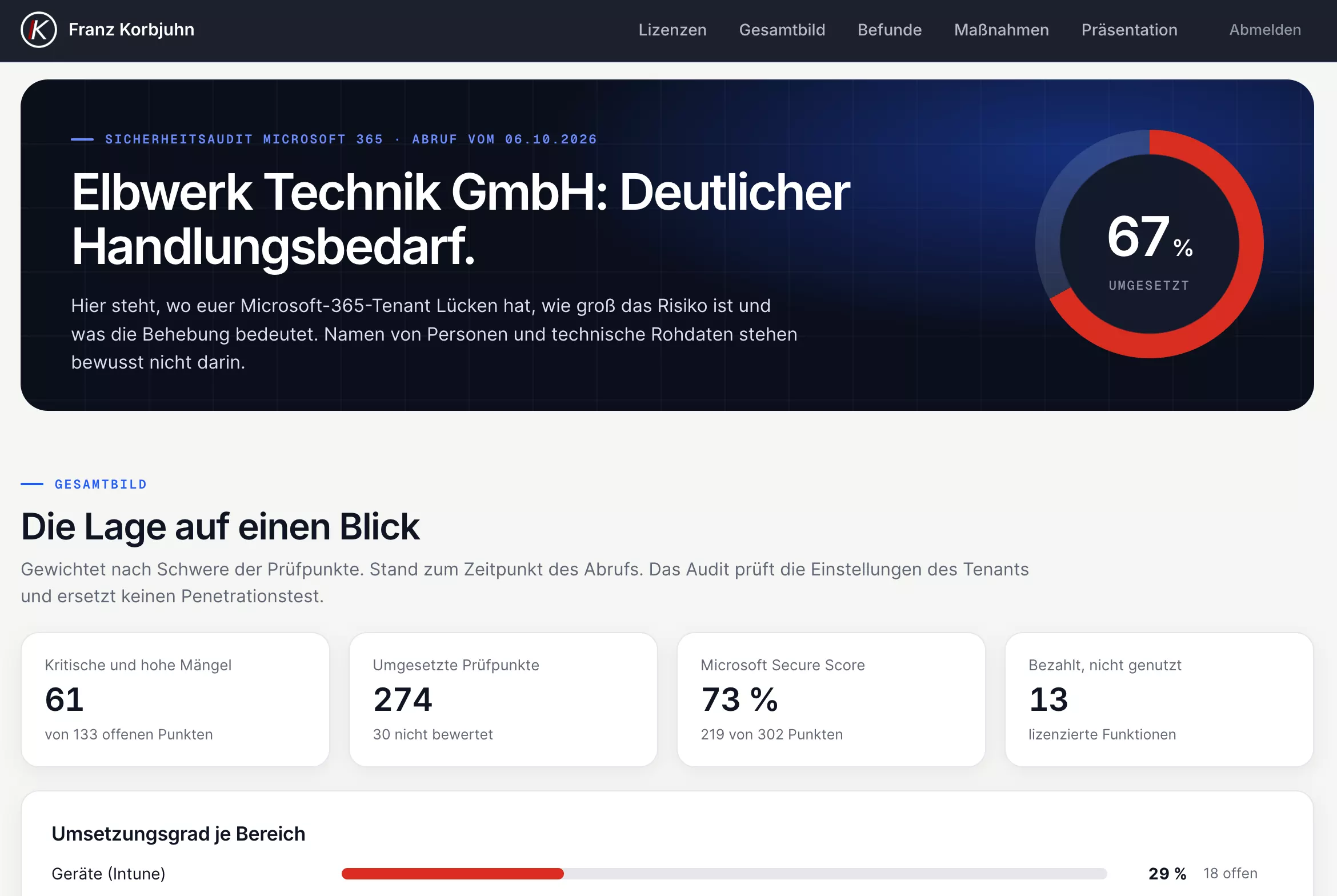
Results, presentation and licences in one place.
In the customer portal you find the assessment, the presentation from our meeting as a PDF, the work list for your IT and the status of your licences. On request, an up-to-date security report is added every month.
Security audit in the customer portal · sample data, in German
Would you like to know where your Microsoft 365 environment stands?
Request the free check. You receive a first assessment as a PDF, personally from me, and can then decide whether to have the findings examined in the full audit.