Microsoft 365 audit: reviewing security settings and licences
Around 500 checks in twelve areas: what a Microsoft 365 audit covers, which findings come up almost every time, what it does for your licences and how the results become an action plan.

A Microsoft 365 tenant is set up once and rarely reviewed thoroughly afterwards. Licences are added when someone joins and keep running when someone leaves. Security features are paid for but never switched on. An audit looks at both: how securely the tenant is configured and whether the licences match what is actually used.
I review Microsoft 365 environments against around 500 checks across twelve areas. This article explains what the review covers, which findings come up almost every time, what you can take from the results and how they become an action plan.
What a Microsoft 365 audit checks
For the review I read your tenant settings, read-only and through access that is closed again directly after the data has been retrieved. Nothing is changed. The review follows recognised frameworks: the CIS Microsoft 365 Foundations Benchmark, the recommendations of the US agency CISA (SCuBA), Microsoft Secure Score, the Intune security baselines and Microsoft’s Zero Trust model.
The twelve areas in detail:
- Sign-in and MFA: Do all accounts have a second factor, are legacy sign-in methods turned off?
- Conditional Access: Which policies apply, which exclusions exist, are there emergency access accounts?
- Admin roles: How many global administrators are there, and do they hold their rights permanently or only when needed?
- Exchange and email protection: SPF, DKIM and DMARC, external forwarding, protection against phishing.
- SharePoint, OneDrive and Purview: external sharing, guest access, retention.
- Teams, devices (Intune), Microsoft Defender, apps and consent, AI and Copilot, organisation settings and backup.
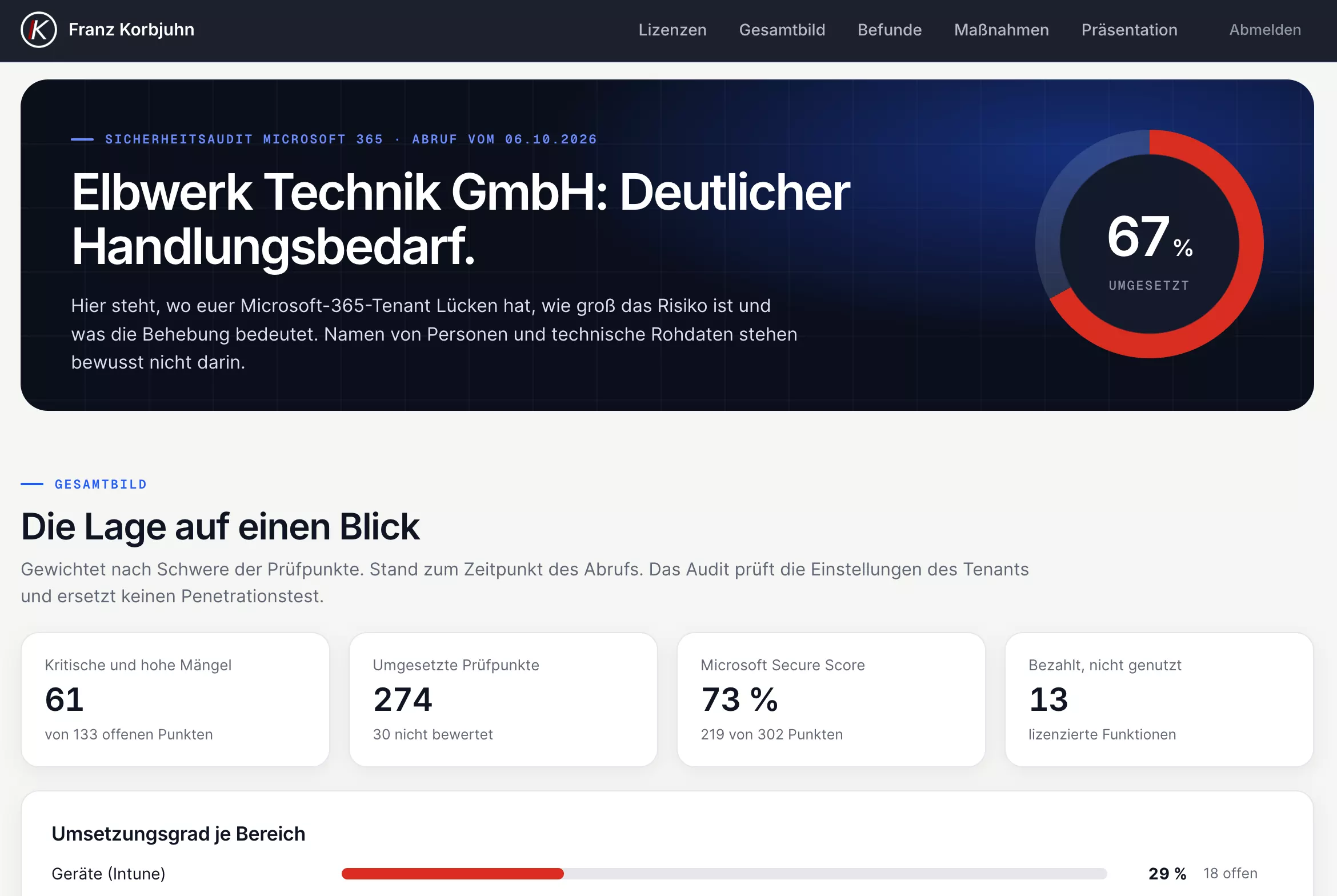
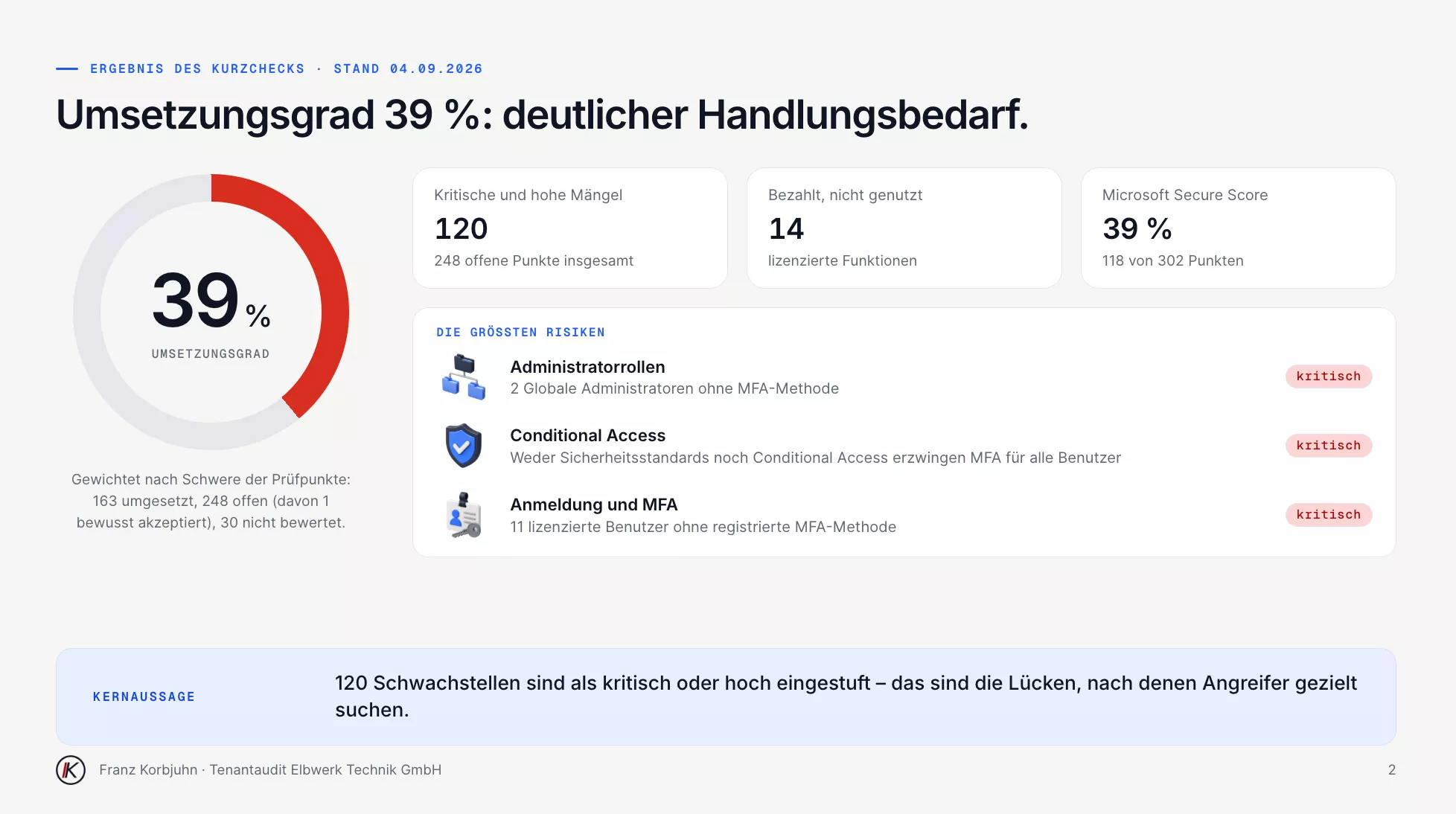
Which checks apply depends on the licensing. If you have no Intune licence, you are not measured against Intune rules. The result is an implementation status per area: the share of applicable checks implemented, weighted by severity, and for every open item an explanation in plain language: what the risk is and what fixing it means for the company.
What I find almost every time
When I review a tenant for the first time, the findings repeat themselves. MFA is only partly enabled. Some accounts hold permanent global admin rights and are used for everyday work. Former employees still have active or licensed accounts. “Anyone with the link” sharing runs unchecked, and there is no backup beyond the recycle bin.
The most common reason is not negligence but the default configuration. Microsoft ships the security features but does not switch them on for your company. Conditional Access, Privileged Identity Management or attack surface reduction rules have to be set up once for the company. Security defaults are a start, but they are not enough.
What the Microsoft 365 audit does for your licences
Security and licences cannot be looked at separately. The licence decides which protection features are available, and what a licence costs only pays off if its features are used. That is why the audit always covers both.
Paid for but not switched on
Every licence consists of individual services that Microsoft lists in the tenant. They tell you which security features you are already paying for. The audit compares this list with the configuration and shows which of them are not or only partly used, grouped by protection goal rather than by licence name. Often a large part of the protection has long been licensed. Which Business Premium features most often lie idle is covered in Business Premium: paid for but not switched on.
Unused licences and unsuitable terms
The comparison also shows how many licences were bought and how many are actually assigned. Spare licences are not always a mistake; a small buffer for new staff makes sense. Licences for accounts nobody uses any more are.
The billing model matters just as much. Since the move to the New Commerce Experience, a licence with a monthly term costs around 20 percent more than the same licence with an annual term paid upfront. For a stable core of staff, the annual term is almost always cheaper. Monthly licences pay off where the number of users really fluctuates. Then there are price changes: with the Microsoft 365 price increase of 1 July 2026 the new price only applies from the renewal, and that date is exactly the right moment to reorganise the licences.
The right licence, not the biggest
Many companies still work with Business Basic or Business Standard. Both lack security features that today’s requirements call for: no Conditional Access, no device management with Intune, no endpoint protection with detection and response. With Business Premium for the workforce and add-ons such as Entra ID P1 or P2 for the IT team, most companies under 300 users can achieve a great deal. E3 or E5 are rarely needed for that. I do not automatically recommend the bigger licence, but the one whose features you will actually use.
Aligning licences and configuration
Licences are often bought wherever it is quickest: directly from Microsoft by credit card, from the reseller who delivered the hardware or from an online shop. Then nobody sees both what the licences cost and whether their features are set up. If I look after licences and configuration together, I can align the two. A review is also possible if you buy your licences elsewhere.
I am a Microsoft partner and provide licences for my clients through the Cloud Solution Provider programme (CSP). If you get your licences through me, you gain three things in particular:
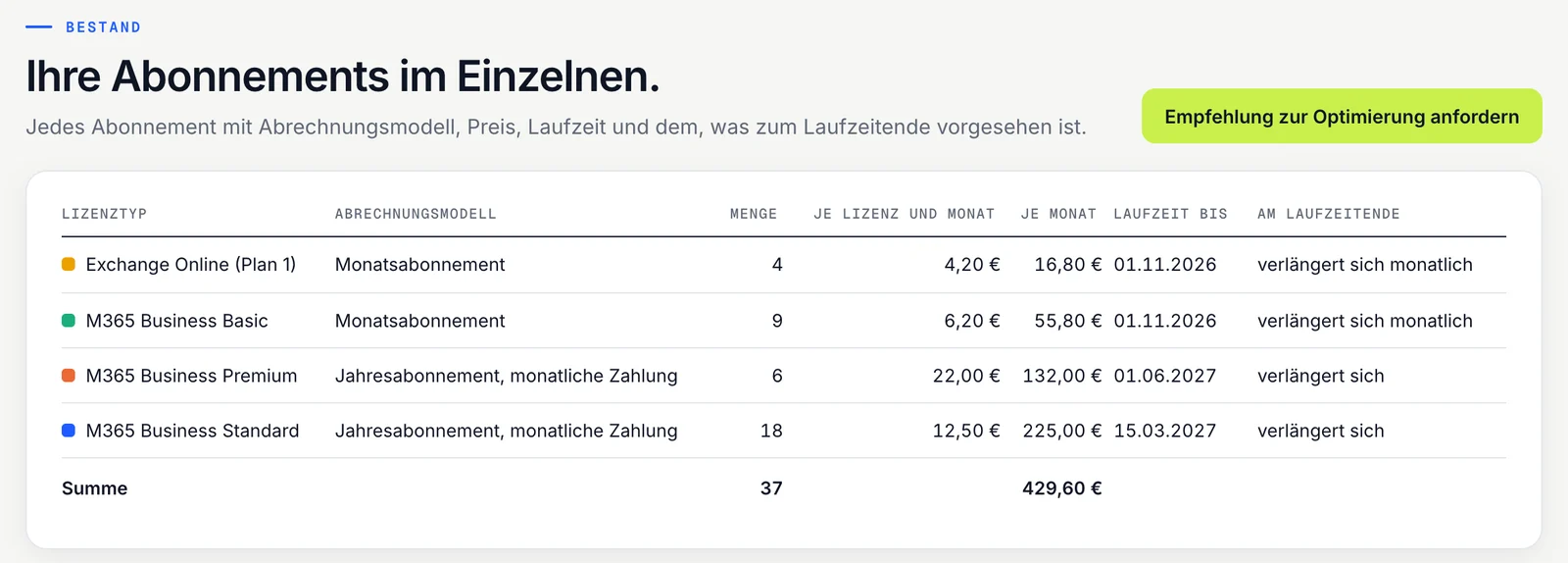
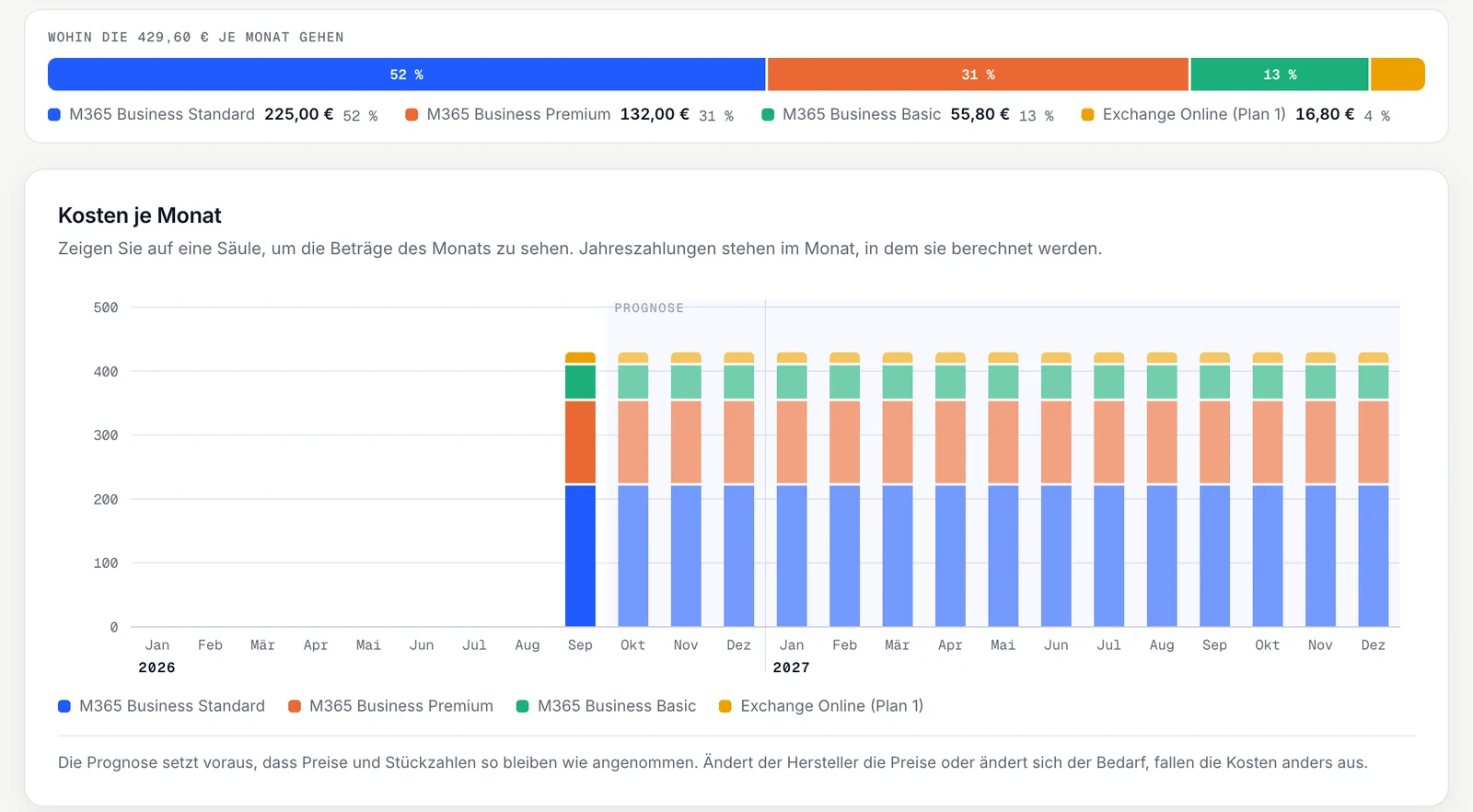
- A constant overview. On request you get access to the customer portal. There you see your licences, the running costs per month and the expected costs for the year. Every subscription is a separate line item, optionally with a note on project or cost centre.
- Recommendations, not just invoices. I see renewals and price changes before they take effect and compare your licences with actual usage. When a different billing model, another licence or cancelling unused licences pays off, I get in touch. Through the portal you can request a recommendation yourself at any time.
- One contact who knows both. I know both your licences and your configuration. When a new licence brings a feature, I agree the setup with you instead of letting it run unused.
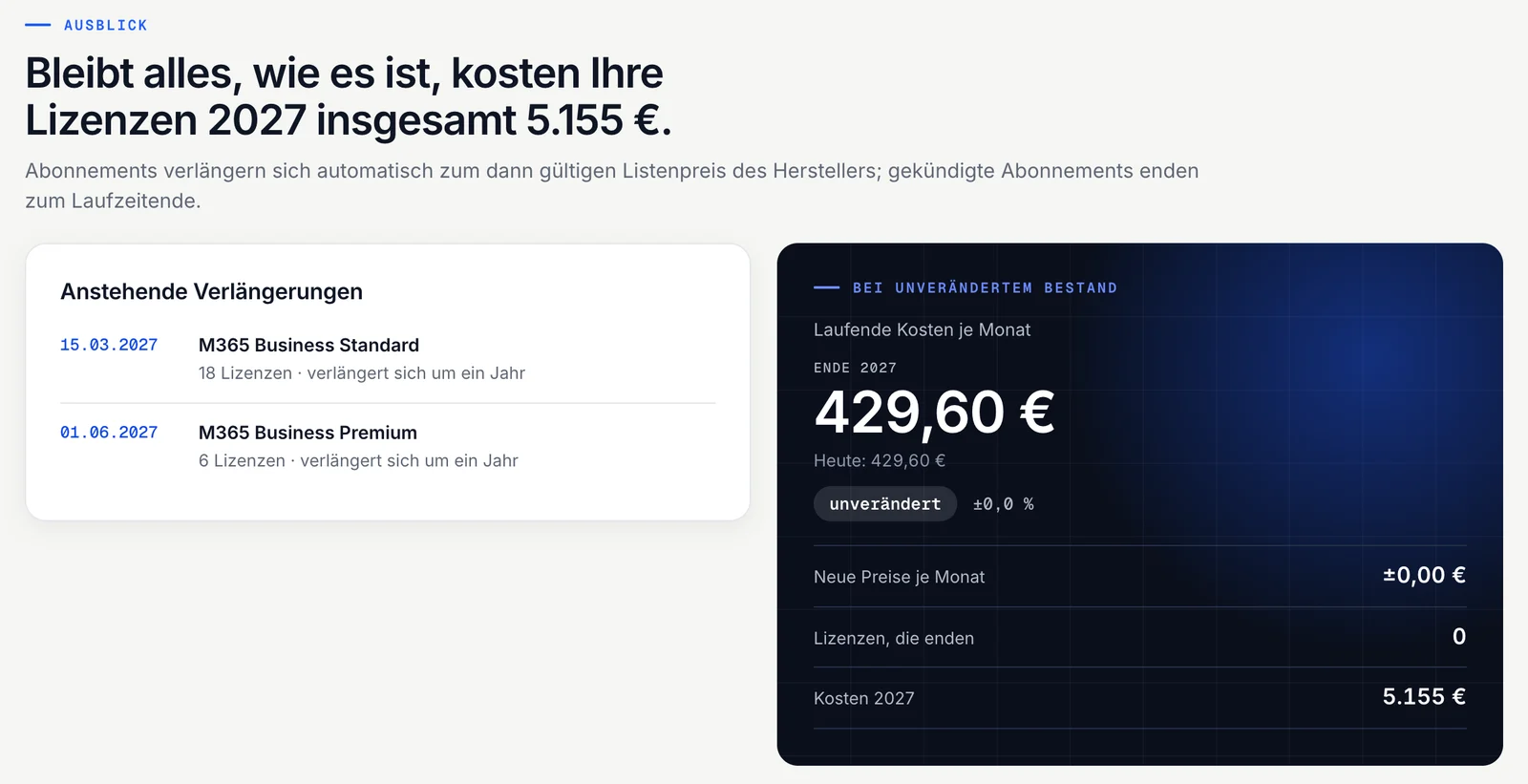
If you get your licences through me, the analysis is not a one-off but ongoing. On request, an up-to-date security report on the tenant is added every month as part of IT support.
How it works
- Free check: You confirm a short order online, your IT grants read-only access. Within 24 hours* you receive a short assessment as a PDF: how your tenant stands overall, where the biggest risks are and what to tackle first. The short report does not include solutions or effort estimates. *from the moment your IT grants access
- Full audit: Every finding with its risk, a presentation for management and an action plan in three phases with effort and sequence, plus the analysis of your licences. You find the results in the customer portal.
- Implementation: This is agreed separately. You decide what gets implemented and who does it: your IT, me or both together. I announce noticeable changes in advance. After each phase I check in the tenant that the measures are working.
Implementation concept and work list
For every measure you approve, there is an implementation concept. It does not describe in general terms what needs doing, but what needs doing in your tenant: on which domains, policies and accounts.
It comes with a work list as an Excel file. Each item names the affected account, mailbox, device or policy, so nobody has to look up what it refers to. Your IT can filter the list, add notes and track progress per item. If you implement the measures yourself or with another provider, they can work with it directly.
Verification after each phase
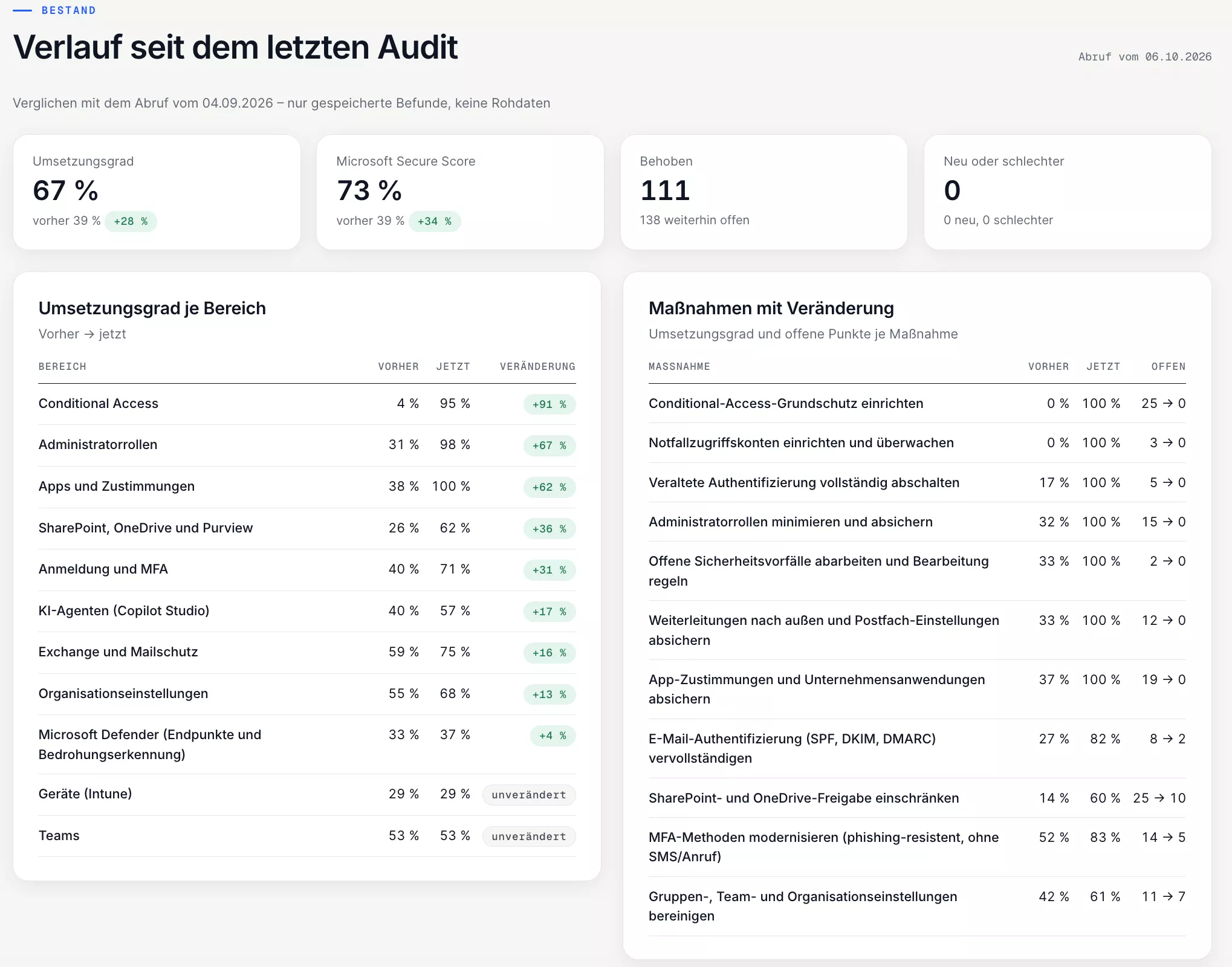
After each implementation phase I check specifically whether the measures are set up in the tenant as intended. Every item that was open for that measure in the audit is checked again, so each original gap is demonstrably closed. Anything that remains unclear does not count as implemented.
The progress view then shows per area and per measure what has improved and what is still open. That turns an audit from a report for the drawer into measurable progress.
What happens in your tenant and what happens to the data
An audit needs access to your tenant. That is why the access is limited, documented and can be verified by your IT at any time:
- Permissions statement: It comes with the order, so before you grant access you receive a list of every permission the audit app has, what I need it for and how long access stays open.
- Read-only, with write protection: The app reads settings, not the content of mailboxes, files or chats. Several layers of technical write protection prevent anything in the tenant from being changed.
- Access log: Every review is logged. Once the work is complete I remove the certificate and the role and block the app; this is recorded in the log too. With the full audit you receive it together with the results; for the free check it is available on request.
- Deletion after the free check: If you do not commission an audit afterwards, I delete the data from the check 30 days after the short report, earlier on request, and send you a confirmation of deletion, which also shows that my access to your tenant has been removed. All I keep are your contact details, the signed short order and the review log as a record.
Who benefits most from a Microsoft 365 audit?
- The tenant has grown over the years and nobody knows exactly who has which rights.
- You work with Business Basic or Business Standard and wonder whether a switch pays off.
- A renewal is coming up, or licence costs have risen without anything changing.
- A cyber insurer, a client or NIS2 asks about the state of your security.
- Copilot is to be introduced, and permissions should be cleaned up first.
- You have changed IT provider and want to know what you are taking over.

Microsoft 365 price increase: comparing Business Standard and Business Premium
Business Basic and Business Standard have cost more since 1 July 2026, Business Premium has not. Why the new price only applies from your renewal and how I compare Business Standard and Business Premium using licence costs as of October 2026.
Read article→
Microsoft 365 for nonprofits: grants, collaboration and setup
Up to 300 free Business Basic licences and up to 75 % off Business Premium: how the Microsoft application works, how I set up accounts and emergency access for associations, and why IT belongs in the budget early.
Read article→
Windows 10 end of support: checking devices and planning the upgrade
Since 14 October 2025 Windows 10 only gets security updates with ESU, and businesses have been in the second ESU year since 14 October 2026. How I check devices and decide between upgrading, replacing and running them for a limited period.
Read article→