Skip to content
Call +49 40 88192642 Send an email [email protected] Chat in Teams [email protected]

Campus · Training portal Training and onboarding, in one place.

Campus is my training portal for your team: mandatory training on data protection and IT security with certificates, an onboarding plan for new employees and an overview of who has done what. Every lesson can also be listened to, read by an AI voice. Tailored to your company, with sign-in via the Microsoft account.

Typical situations

What customers tell me.

Records

Typical situation

We have to prove data protection training every year. Who has actually done it?

How I can help

Everyone gets the mandatory course with a due date, reminders and a certificate. You see at a glance who is done and have the records ready for your data protection officer.

Book a live demo→

Onboarding

Typical situation

New employees ask the same question ten times in their first week.

How I can help

An onboarding plan guides through the first weeks: read and confirm policies, take courses, tick off tasks for the buddy and HR. Different for accounting than for sales.

Book a live demo→

Email fraud

Typical situation

One wrong transfer and we would be in real trouble.

How I can help

Short courses on phishing, passwords and scams, with examples from everyday office life. Ten minutes that make the difference when it matters.

Book a live demo→

Does not fit

Typical situation

There are plenty of training portals, but none fits us.

How I can help

I adapt the content to your company and turn your own documents and policies into courses. With your logo, your colours and, if you like, at your own web address such as campus.your-company.com.

Book a live demo→
Read aloud by an AI voice

Every lesson, ready to listen to.

Not everyone likes reading long texts on screen. In Campus, a natural-sounding AI voice reads every lesson aloud with one click: at the office with headphones, working from home or on the go. The text stays right there, and exercises and tests remain interactive.

lesson in every course
Every lesson in every course
languages, German and English
2 languages, German and English
no extra software, no app
1 click no extra software, no app
Onboarding new employees

Well supported from day one.

New colleagues get an onboarding plan for their first weeks: which courses are due when, which policies to read and confirm, and who prepares what. Campus starts the plan on the start date, reminds people of what is due and shows the buddy, the manager and HR what is still open. At the end, Campus asks how the onboarding went.

the plan starts automatically on the start date
Day 1 the plan starts automatically on the start date
kinds of steps: course, policy, task
3 kinds of steps: course, policy, task
buddy, manager or HR tick off their tasks
By role buddy, manager or HR tick off their tasks
Services in detail

What Campus does for your team.

The views come from a sample company. Your Campus shows your logo, your colours and your courses.

Everything at a glance.
For employees

Everything at a glance.

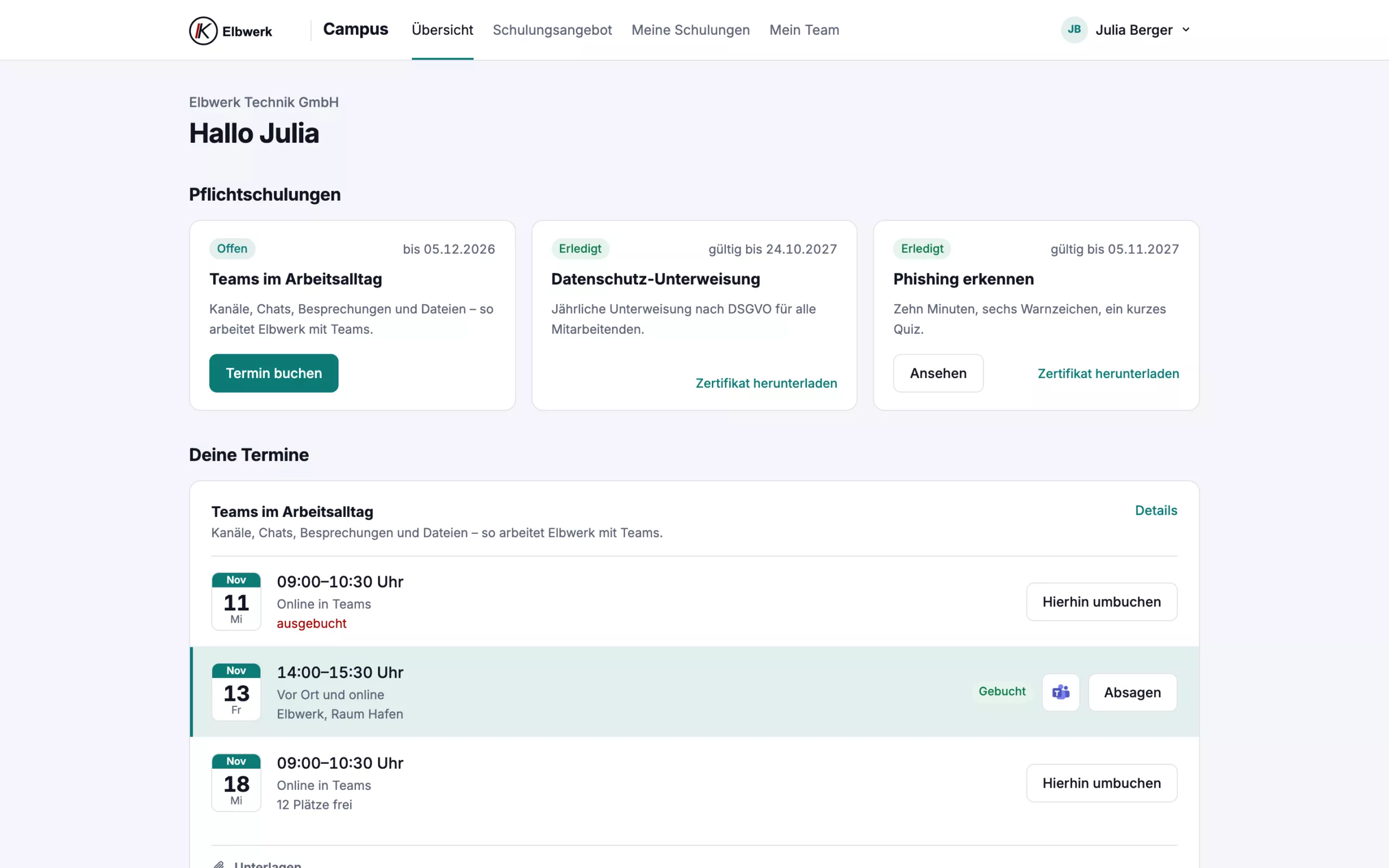
After signing in, everyone sees what is due: mandatory training with deadlines, booked sessions and courses in progress.

  • Sign-in with the Microsoft account, no new password
  • Mandatory training with status and deadline
  • Book, rebook or cancel sessions
  • In German and English, on computer and phone
Records at the push of a button.
Mandatory training and records

Records at the push of a button.

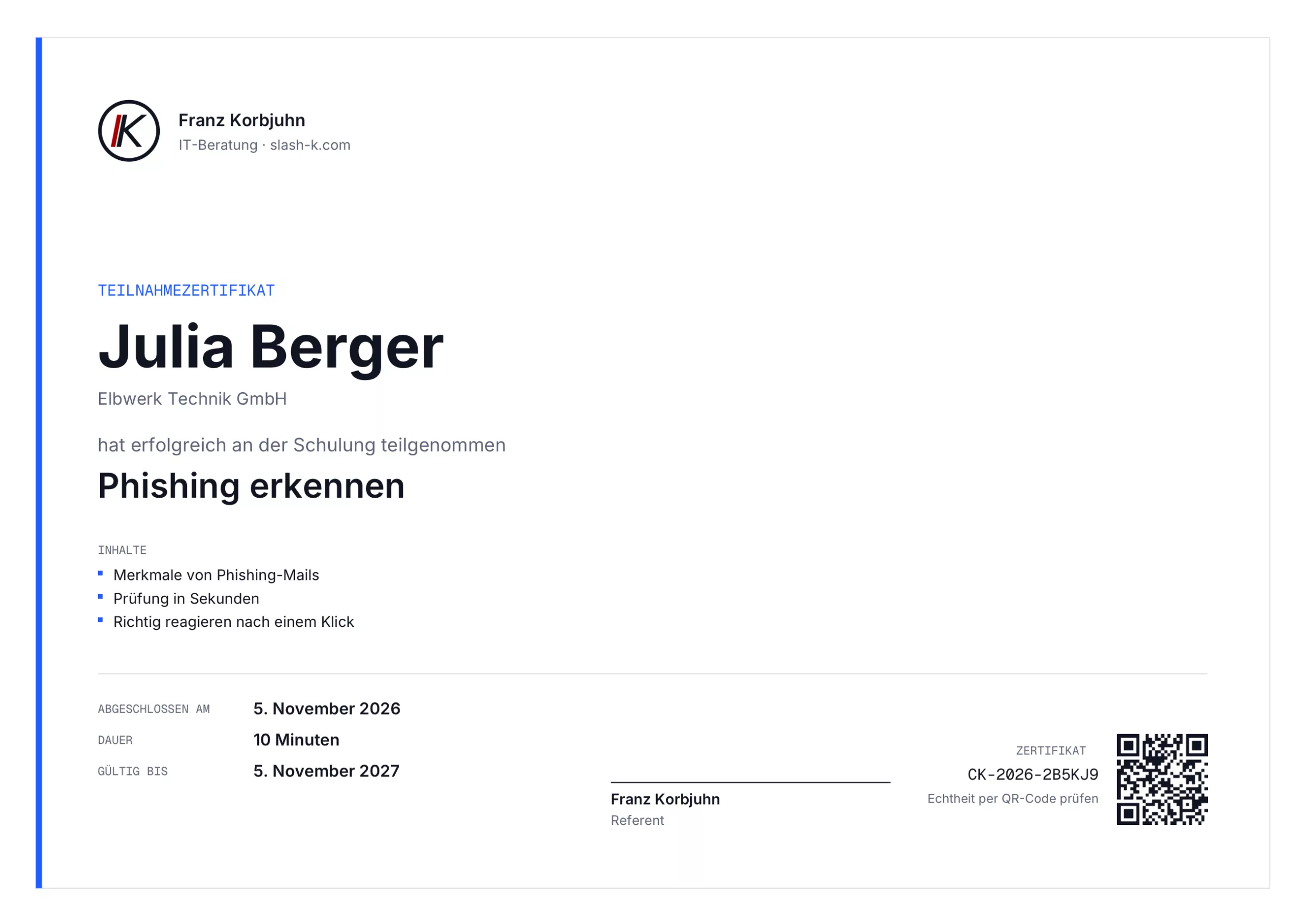
Every completed course comes with a certificate showing date, content and validity. Its authenticity can be checked via the QR code.

  • Deadlines for new and existing employees
  • Reminder before the deadline, report to managers when overdue
  • Annual repetition if required
  • All records as a list for data protection and audits
Short, practical, with examples from the office.
Self-paced courses

Short, practical, with examples from the office.

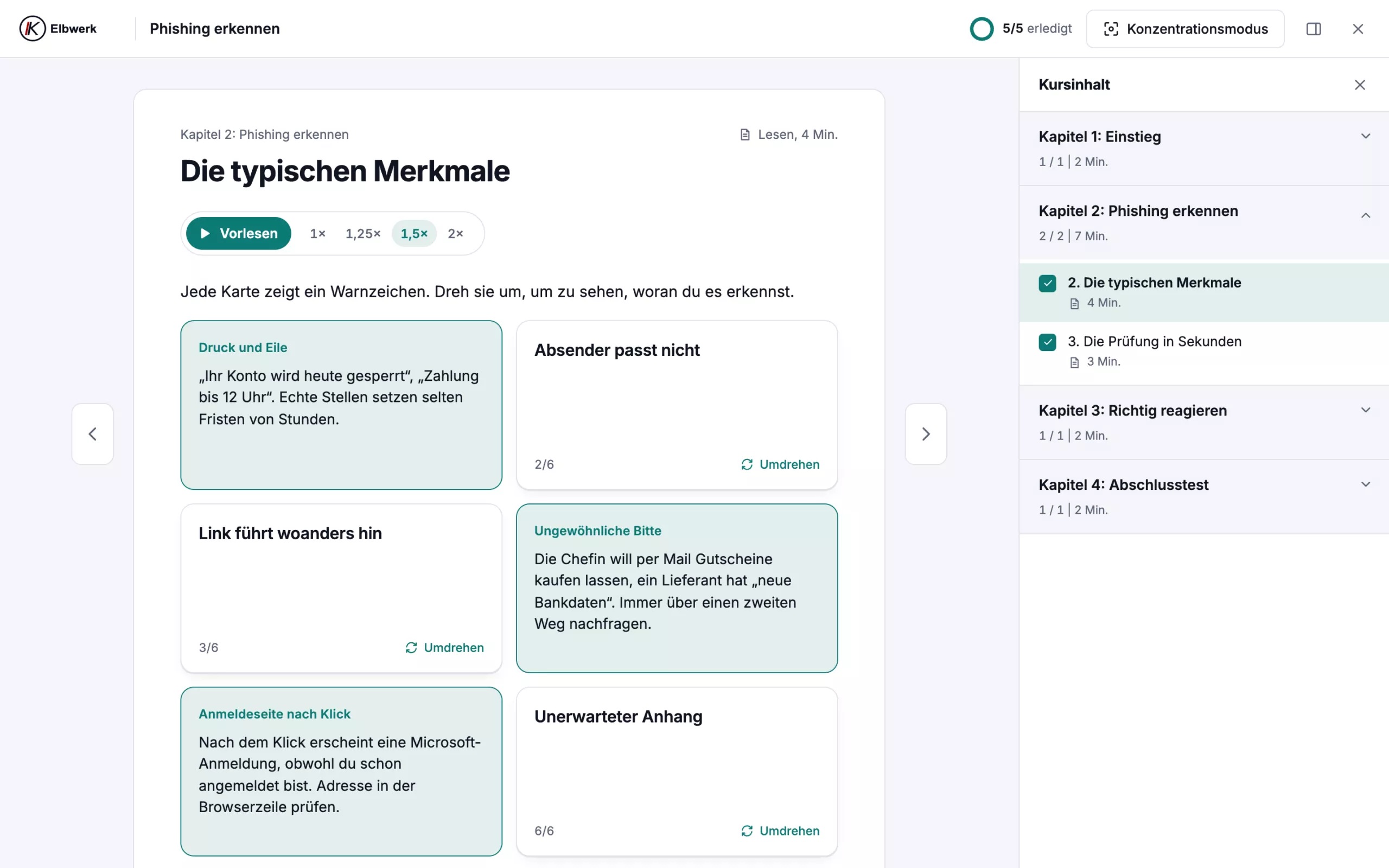
Every course is structured in chapters, with exercises, quick checks and a final test. Focus mode hides everything else.

  • Fact sheet and practice files to take away
  • Personal notes on every lesson
  • Progress is saved, continue any time
  • Courses from your own policies are possible
New employees find their feet faster.
Onboarding

New employees find their feet faster.

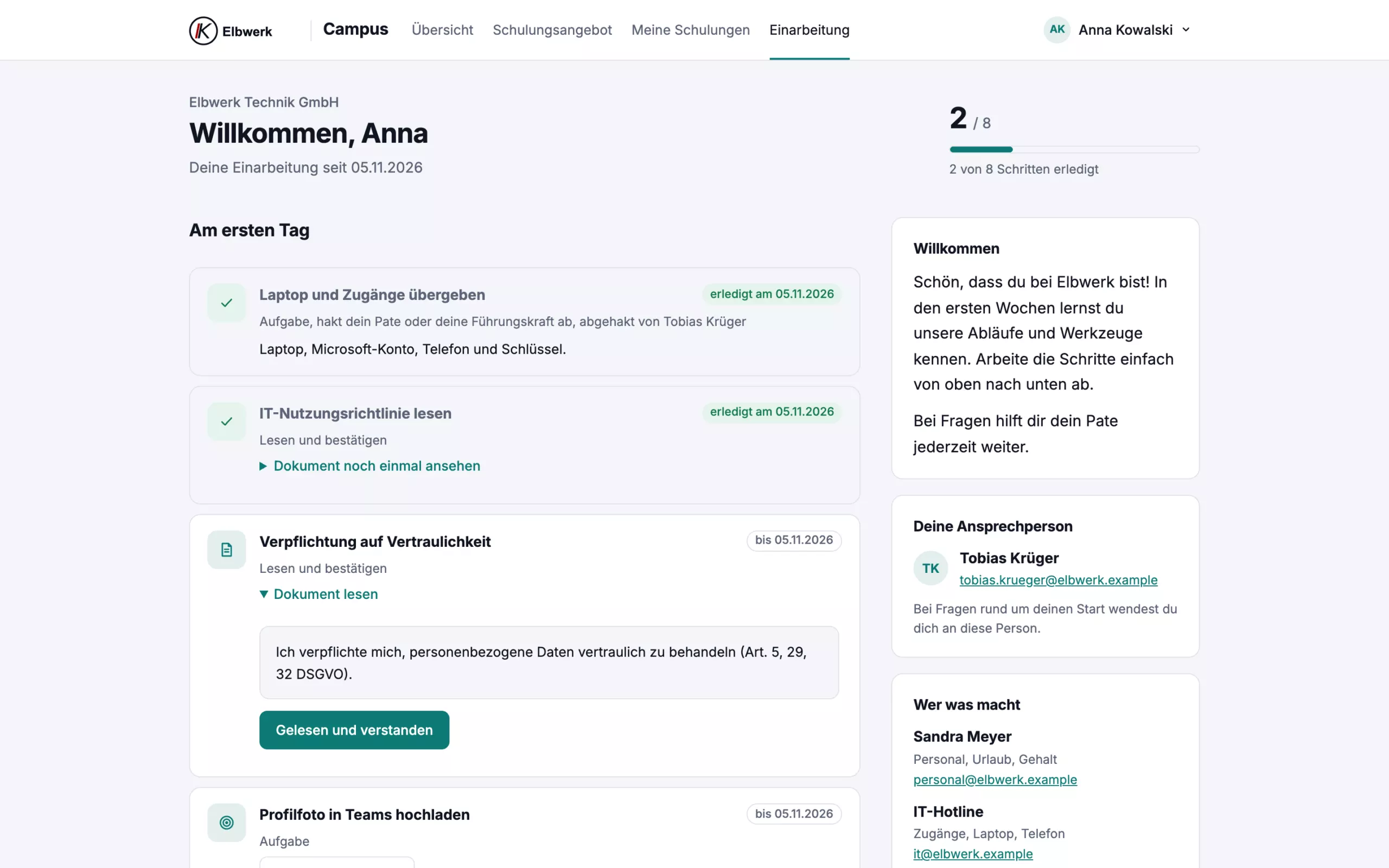
A plan guides through the first weeks: courses, policies to read and confirm, and tasks for the buddy and HR.

  • Starts automatically on the start date
  • Read confirmation with timestamp
  • Own steps for each department
  • Short feedback after 30 days
Live training without the admin work.
Live in Teams

Live training without the admin work.

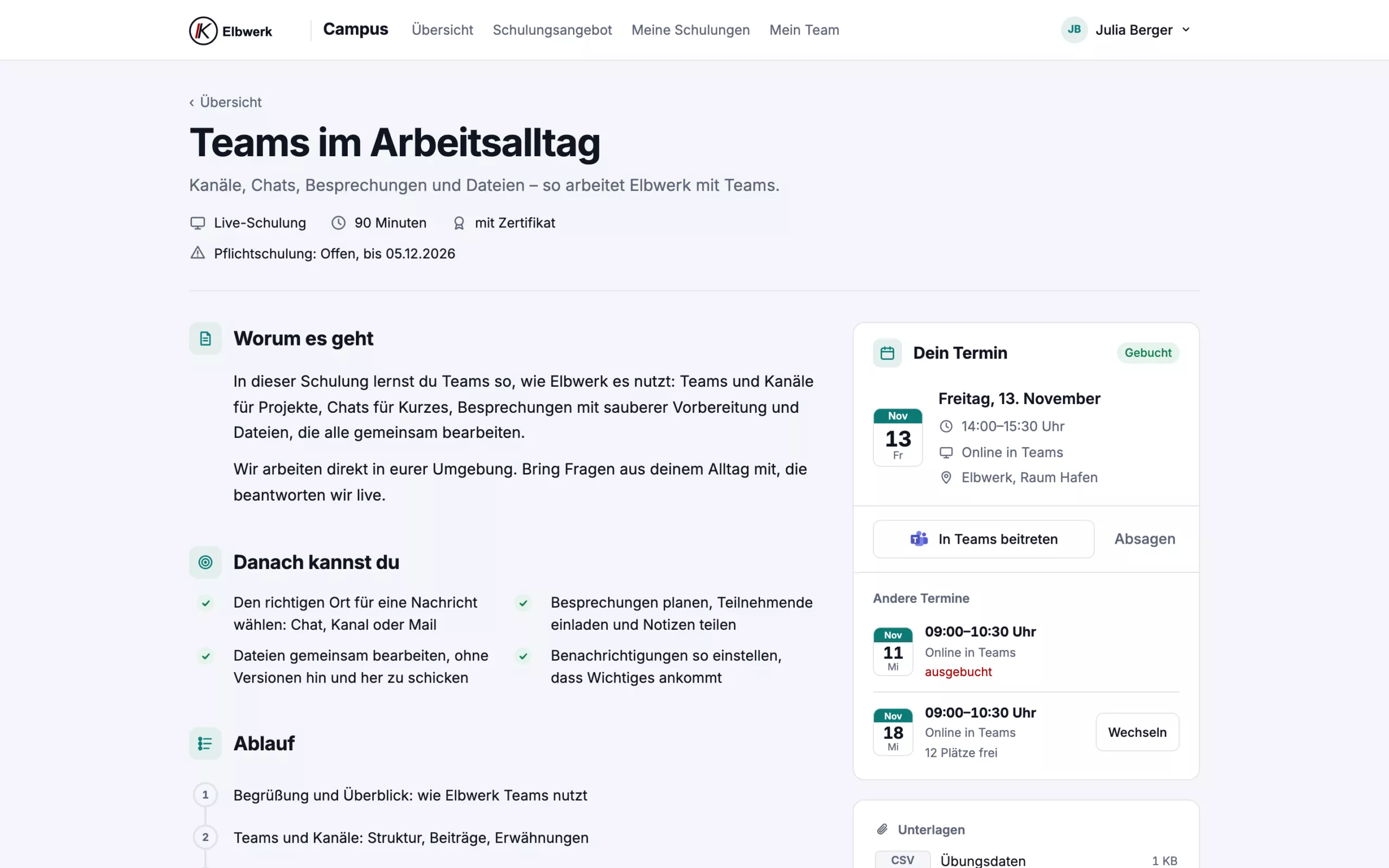
For scheduled training, employees choose a time slot. The Teams invitation goes straight into their calendar.

  • Waiting list, moving up and rebooking
  • Reminder one day and one hour before
  • Session requests when no date fits
  • All materials for the training in one place
See where your team stands.
For managers

See where your team stands.

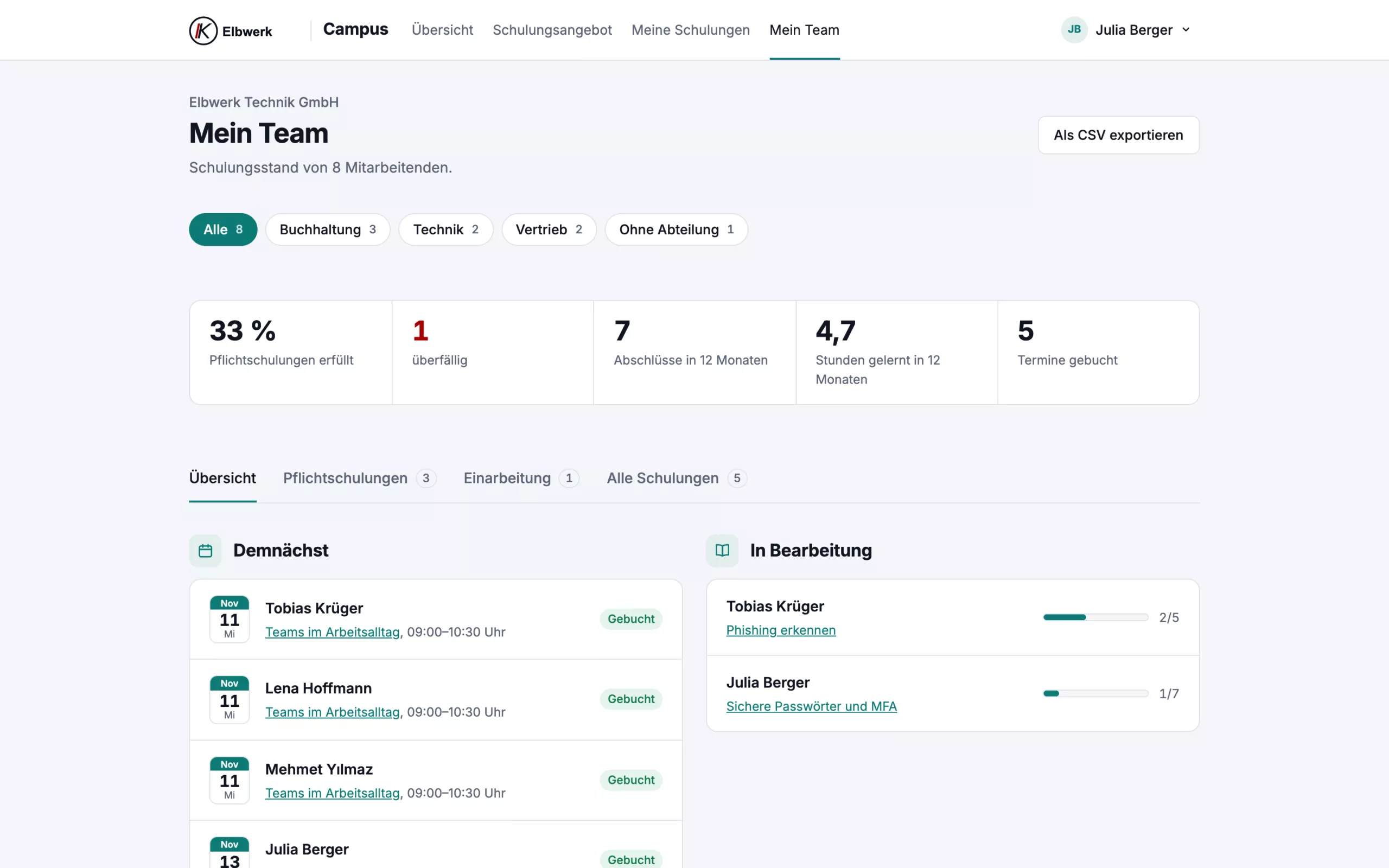
Managers see their department, management sees everyone: who is done, who is overdue and what is planned.

  • Key figures and a detail view per person
  • Reminder with one click
  • Departments taken from Microsoft 365
  • Annual report for management and data protection
For certified companies

Calm before the next audit.

If you are certified to ISO 9001 or ISO 45001, you need to show who needs which training, who has completed it and whether it was effective. Campus assigns mandatory training precisely, to departments or roles such as first aiders and qualified electricians, records external certificates with expiry dates, collects read confirmations for operating instructions and asks the manager after the training whether it was effective. For the auditor, you create the training record as a PDF in one click.

training plan, qualification matrix and all records for the auditor
1 PDF training plan, qualification matrix and all records for the auditor
kinds of evidence: training, external certificate, read confirmation, effectiveness
4 kinds of evidence: training, external certificate, read confirmation, effectiveness
before a certificate expires, Campus sends a reminder
60 days before a certificate expires, Campus sends a reminder
Packages

One fixed price per month.

You pay for places, not per course. One place covers one person trained in the contract year. How many people will you train?

Basis

To get started: mandatory training and records.

59 € per month

Base price with 10 places. Each additional place 4,90 €

Setup €190 once

  • Access for all employees
  • Sign-in with the Microsoft account
  • Courses from the catalogue of your choice, e.g. data protection, IT security, Microsoft 365
  • Every lesson available as audio, read by an AI voice
  • Mandatory training with due dates, reminders and certificates
  • Overview for managers and departments
  • Annual report for management and data protection

Complete

For companies that want to design and run training themselves.

249 € per month

Base price with 20 places. Each additional place 9,90 €

Setup €690 once

  • Everything in Plus
  • The entire course catalogue, including every new course
  • Your own training sessions with your calendar and trainers
  • Your own editorial team: your employees create courses and onboarding plans themselves
  • Knowledge base: your company's guides and policies in one place, with search
  • For ISO audits (e.g. 9001, 45001): duties by role, effectiveness reviews, external records and training record as PDF
  • Up to two courses a year that I create from your documents and policies

Optional extras

Course from your documents from €490 once per course
I turn your policy or guide into a course with a test and certificate. Can be added to Basis and Plus, two courses a year are included in Complete.

All prices net plus VAT. Every person who starts a training automatically takes a place; billed monthly by places taken, at least the places in your package. A place stays taken until the end of the contract year, even if the person leaves; if they return, they need no new place. Access is personal. 12-month term, then cancellable monthly. To get to know it, I will show you Campus in a live demo. In the first month you can leave without further monthly fees; only the setup is charged.

Book a live demo→
Course catalogue: AI and Microsoft 365

AI at work, used properly.

Prompts that get results while saving usage and cost. Shared projects instead of lone efforts, results in SharePoint instead of scattered chat histories. For the tools your team actually uses.

  1. 01

    ChatGPT at work

    Good prompts, efficient use and teamwork with ChatGPT Business and Enterprise: sharing projects, templates for the team, storing results properly.

  2. 02

    Claude at work

    Prompts following Anthropic's guidance, making usage limits go further, projects with shared knowledge and instructions for the whole team.

  3. 03

    Microsoft Copilot at work

    Copilot Chat and Microsoft 365 Copilot in Word, Excel, Outlook and Teams. Why a tidy SharePoint makes the answers better.

  4. 04

    Using AI tools safely

    What can go into Copilot and ChatGPT, how to check results and what the AI literacy duty of the EU AI Act (Art. 4) means.

  5. 05

    Excel basics

    Tables, formulas, filters and charts step by step, with practice files.

Course catalogue: security and data protection

Security and data protection for everyone.

The mandatory topics, explained clearly with examples from offices, law firms and practices. Every course has chapters, exercises, a final test, a certificate and a fact sheet, to read or to listen to.

  1. 01

    Data protection essentials

    The regular GDPR briefing: principles, everyday office life, breaches and requests. With your contact person on the fact sheet.

  2. 02

    Spotting phishing

    Warning signs, the 30-second check and what to do if someone has clicked.

  3. 03

    Social engineering and CEO fraud

    Fake boss, changed bank details, a call from the so-called support desk: how call-backs and the four-eyes principle protect you.

  4. 04

    Passwords, passkeys and MFA

    Secure sign-in without sticky notes: password managers, Microsoft Authenticator and passkeys.

  5. 05

    Working from home and on the move

    What goes without saying in the office also applies at the kitchen table, on the train and in a hotel.

  6. 06

    Recognising and reporting a security incident

    Stay calm, take the device offline and report it straight away, without blame.

Data protection

Your data stays in Germany.

Training content contains internal information: processes, contacts, policies, names. That is why Campus runs on its own server in Germany, operated by me. Passwords and credentials never belong in a course; they stay in your password manager.

Data centre in Falkenstein

Campus runs on a server operated by Hetzner Online GmbH in its Falkenstein data centre (Saxony). The data centre is certified to ISO/IEC 27001.

Data processing agreement

You receive a contract under Art. 28 GDPR from me. I process your data only to run Campus for you, never for any other purpose.

Separated per company

Each company has its own area with its own courses. Other customers see neither your content nor your employees.

Encrypted and backed up

Every connection is encrypted via HTTPS, and the database is backed up daily. Campus never sees your employees' Microsoft passwords.

How it works

Your own Campus in four steps.

  1. 01

    Conversation

    Which training is mandatory, who gets access and how new employees start.

  2. 02

    Setup

    Sign-in with the Microsoft account, departments, courses and, if you like, your branding.

  3. 03

    Launch

    Your employees receive an email with a link and get started.

  4. 04

    Ongoing

    Reminders, records, new employees and the annual report.

FAQ

Briefly answered.

Have a different question? Just write to me.

No. They sign in with their Microsoft account. Anyone without one, such as a freelancer, receives a code by email.

Employees see their own status. Managers see their department, management sees everyone. Nobody sees individual test answers, only whether a test was passed.

Only what training and proof require: name, email address, department, course progress, sessions and certificates. There are no advertising or analytics trackers, and videos are hosted on the same server. On request, I delete the data of individual people or of the whole company.

Yes. I turn your policies and guides into courses with a test and certificate. In the Complete package, your employees can also create courses and onboarding plans themselves, with a guide inside Campus.

No. External people get access to the courses, mandatory training only applies to your employees.

Yes, in the Complete package. Campus keeps the records an auditor wants to see on competence and briefings: who has which duty, who completed it when, read confirmations and the effectiveness review. You create the training record as a PDF yourself. Certification and the choice of content remain with you and your certification body.

Campus for your team?

Tell me briefly how many employees you have and which training is mandatory. I will show you Campus in half an hour via Teams.