Employee training with Campus: mandatory training, onboarding and records in one place
Data protection training, phishing, new employees: how Campus organises mandatory training with deadlines, onboarding and records for small companies, from the reminder to the annual report.

In small companies, employee training is rarely a topic of its own. Data protection training is due once a year, phishing emails keep getting better, new colleagues should know the policies, and in the end someone asks for proof. With Campus, my training portal, all of this runs in one place: mandatory training with deadlines and certificates, onboarding for new employees and an overview of who has done what.
Why employee training gets left behind in small companies
It is rarely a lack of will. It is a lack of someone who remembers. In a law firm with twelve people, nobody has the job “training”. The briefing becomes a meeting in the conference room, the attendance list a sheet of paper, and whoever was ill never catches up. Two years later the data protection officer or the insurer asks who was trained and when.
One meeting for everyone, a list to sign, a folder in the cupboard. Whoever missed it only shows up at the next audit.
Each person gets the course with a deadline, takes it when it suits them and receives a certificate. Anyone still open after the deadline is visible to their manager.
A year with Campus
Once it is set up, Campus takes care of the recurring steps. Management decides which training is mandatory, the portal does the rest.
- SetupMicrosoft sign-in, employees, courses
- Assignmentmandatory training with deadlines, also for new employees
- Reminderby email before the deadline, then to managers
- Proofcertificate with QR code on completion
- Annual reportas a PDF for management
Campus assigns a training again once it expires after twelve months. New colleagues get the mandatory training with their own deadline from their start date. For people who leave, the records stay for the retention period, while personal notes are deleted.
Onboarding new employees: the onboarding plan
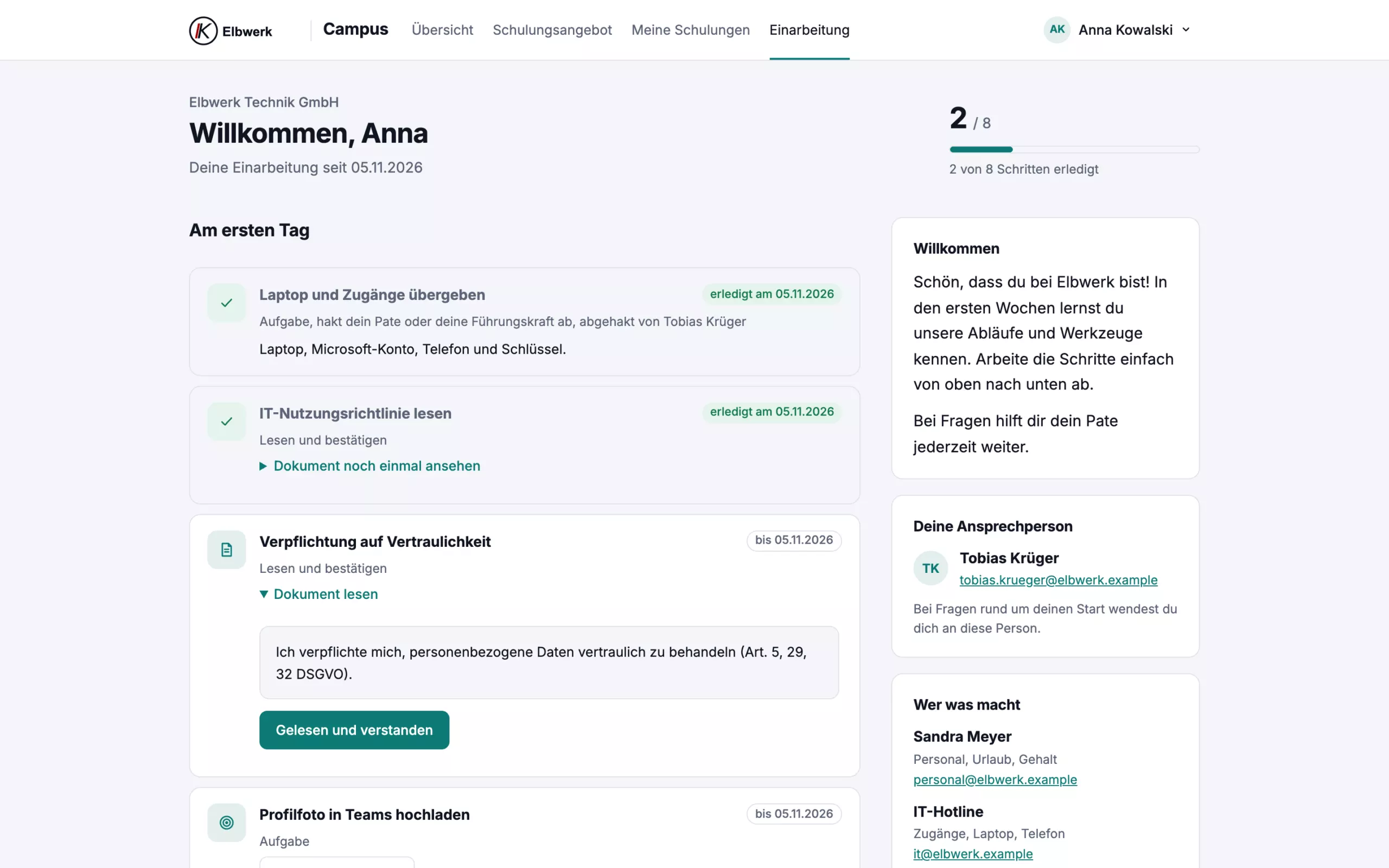
A lot comes together in the first weeks: reading policies, taking courses, setting up access, getting to know colleagues. An onboarding plan in Campus guides through this time. Each step has a deadline from the start date.
- Courses get their deadline automatically.
- Policies are confirmed by the new person as “read and understood”, with a timestamp and version. If a policy changes, it is confirmed again.
- Tasks are ticked off by the person, their buddy or HR.
Sample plan. Each company sets its own steps, deadlines and departments.
The technical side, meaning account, licences and device, can also be prepared in Microsoft 365. I describe how in the article Automating employee onboarding.
What employees see
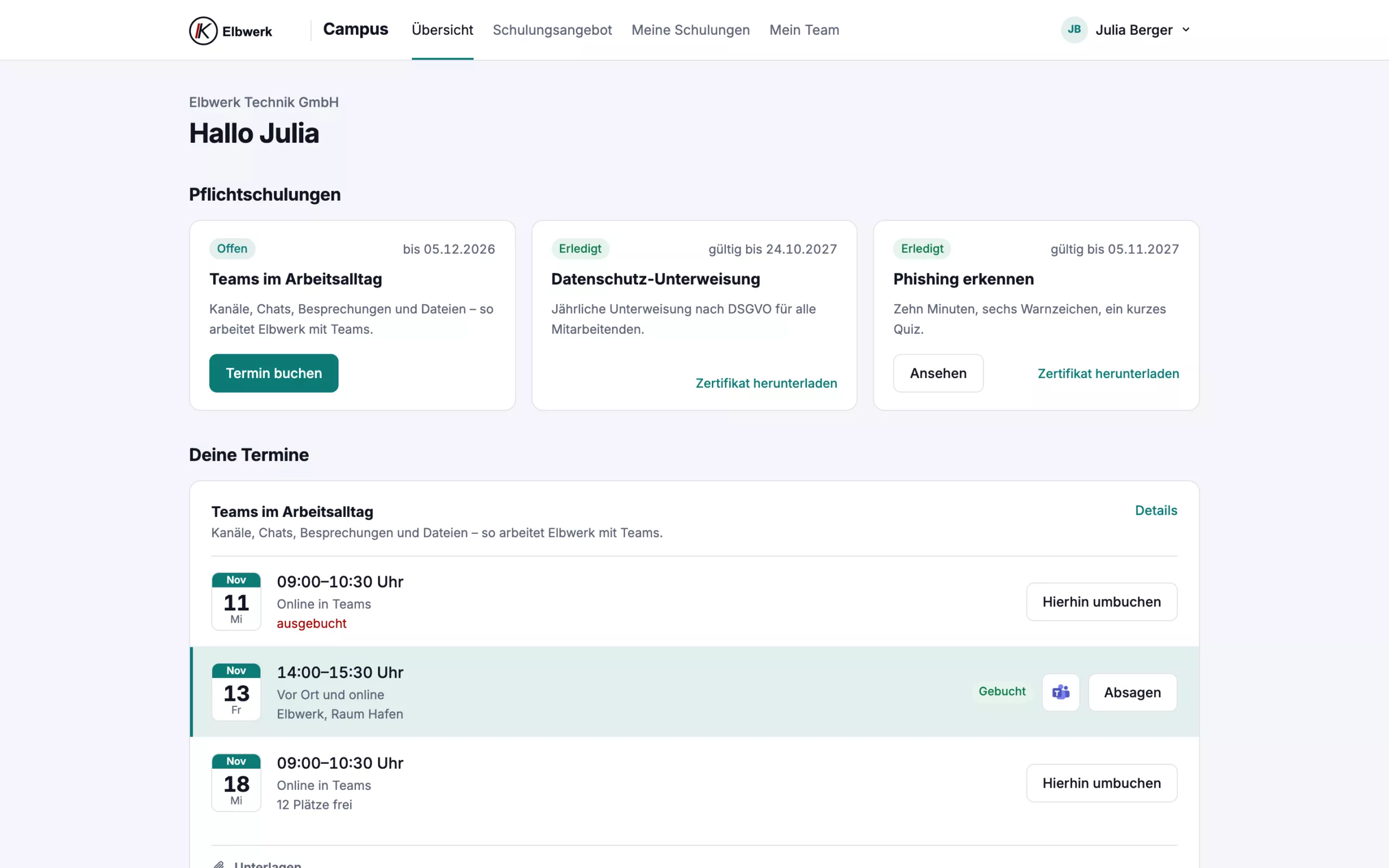
After signing in, what is due is at the top: mandatory training with deadlines, booked sessions and courses in progress. Employees need to know nothing more to get started.
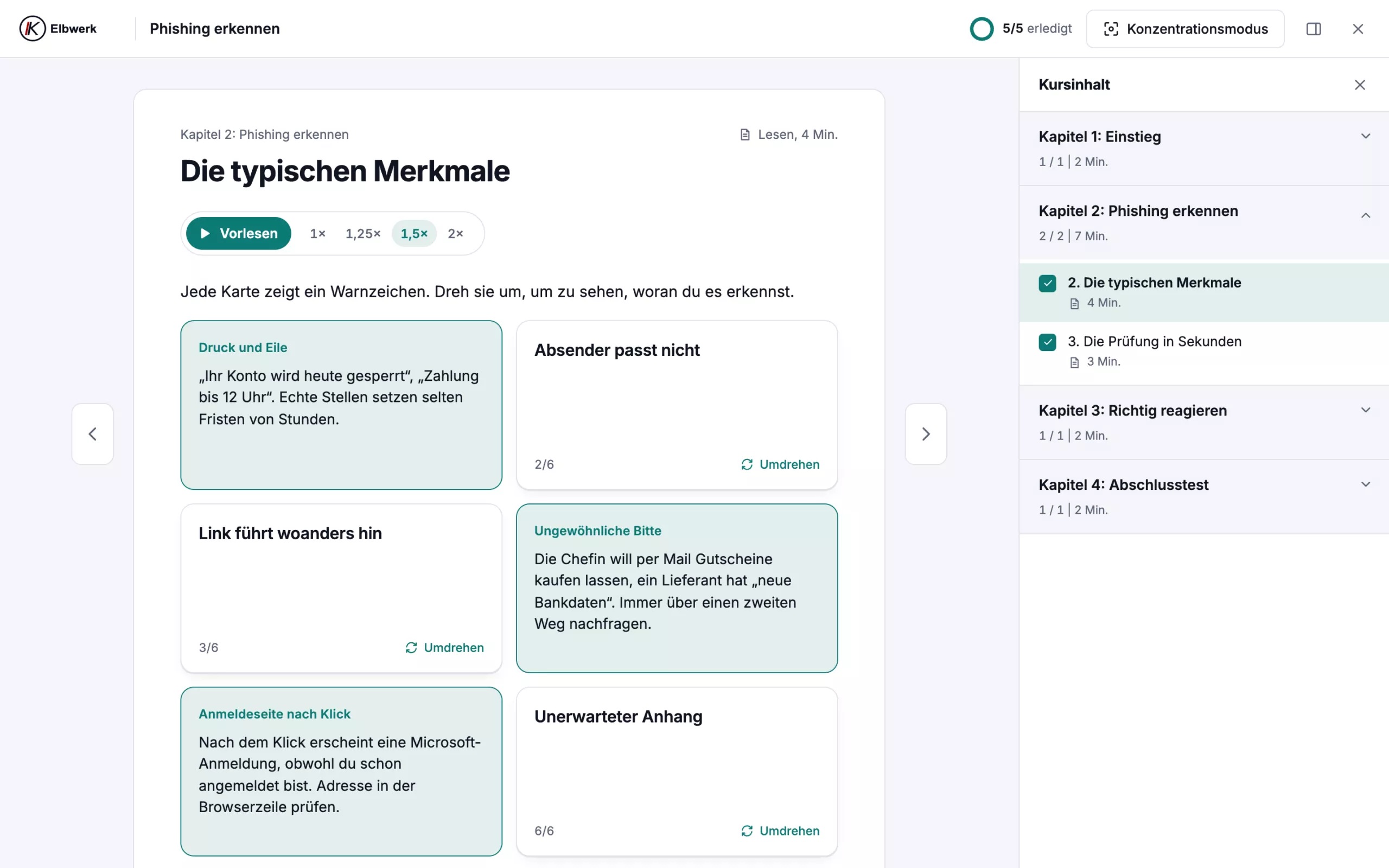
Courses are divided into chapters and short lessons, with exercises, check questions and a final test. Every lesson can be read aloud, faster if you like, for example on the way to work. A focus mode hides everything else.
Courses that fit your own company
A generic course on phishing is quickly forgotten. What sticks is what sounds like your own day: the fake invoice from a known supplier, the supposed call from the bank, the message in the name of the boss. That is why every company in Campus gets its own version of each course. The data protection contact appears in the course and on the fact sheet, and examples can be adapted.
The catalogue covers what comes up in most offices, firms and practices:
- Security and data protection: data protection basics, spotting phishing, passwords and multi-factor sign-in, social engineering, working from home and on the move, reporting a security incident.
- AI at work: using AI tools safely, plus one course each on ChatGPT, Claude and Microsoft Copilot at work.
- Tools: Excel basics with practice files.
Every course comes with a fact sheet as a PDF. On request I add courses built from your own policies and guides, with a test and certificate. Live training in Teams can be planned too: employees pick a slot, the invitation lands in their calendar and Campus takes attendance from Teams.
Proof for management and audits
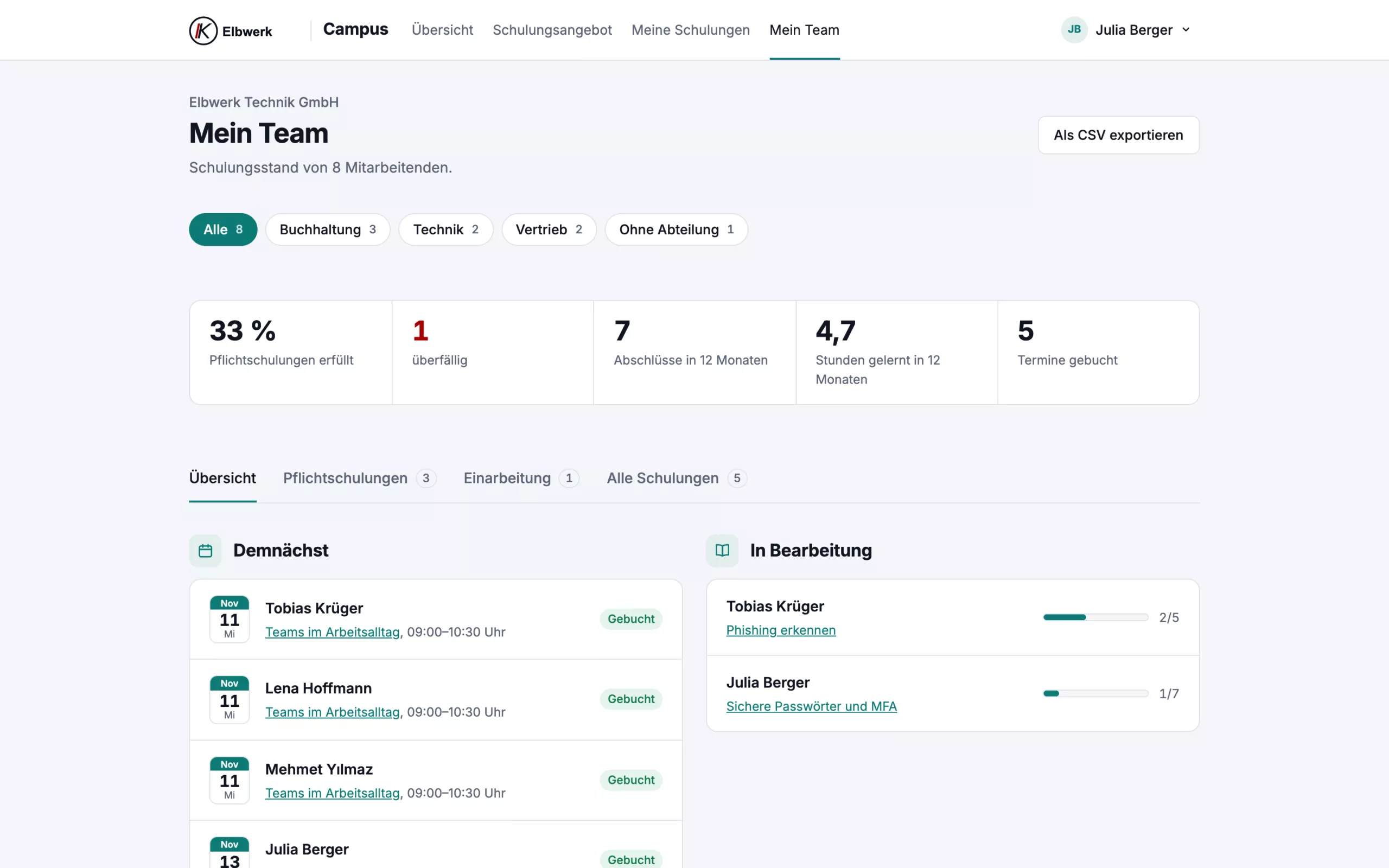
Managers see their team in Campus, management sees everyone: who has finished, who is overdue and what is planned. The list can be exported. Every completed training comes with a certificate showing the date, contents and validity. The QR code shows whether it is genuine.
Once a year management receives a report as a PDF: participation per person, status of mandatory training, open items and a short summary. That helps with questions from data protection officers, insurers or clients who want to see training records. Whether a training is legally required is for your data protection officer to clarify. Campus makes sure it happens and is documented.
For companies with ISO certification, for example to ISO 9001 or ISO 45001, Campus goes further in the Complete package: mandatory training applies precisely to departments or roles such as first aiders and qualified electricians, external certificates are recorded with expiry dates, operating instructions are acknowledged with read confirmations, and after the training the manager assesses whether it was effective. For the audit, you create the training record with qualification matrix as a PDF.
Data protection and technology
- Location: Campus runs on a server in a data centre in Falkenstein, Germany, separated per company.
- Sign-in: with the company’s Microsoft account. Campus takes employees from Microsoft 365, only accounts with a mailbox, no admin or service accounts.
- Processing on your behalf: I process the data for you under a contract according to Art. 28 GDPR.
- Deletion periods: records are deleted three years after completion, data of former employees according to fixed rules.
On request Campus runs under your own address, such as campus.your-company.com, with your logo and colour.
What does Campus cost, and which package fits?
You pay for places, not per course. One place covers one person trained in the contract year and stays taken until the end of that year. Basis costs €59 a month with 10 places, each additional place €4.90. Plus costs €129 with 15 places, each additional one €7.90. Complete costs €249 with 20 places, each additional one €9.90. A one-off setup fee of €190, €390 or €690 applies. All prices net, 12-month term.
Frequently asked questions about employee training with Campus
Do my employees need a separate account?
No. They sign in with their Microsoft work account. Without Microsoft 365 they use their email address, the password from the invitation and a code sent by email.
How long does a training take?
A course takes 20 to 45 minutes and can be paused at any time. Progress is saved.
Can I see Campus first?
Yes. In a live demo via Teams I show you Campus with sample data in half an hour. In the first contract month you can leave without further monthly fees; only the setup is charged.

How to secure Microsoft 365: the key settings for small companies
Which Microsoft 365 settings come first, which licence they need and what is possible without Business Premium. An overview for managing directors and the people responsible internally.
Read article→
PHP2Shell: is my website affected by the PHP vulnerability?
Two critical vulnerabilities in PHP threaten millions of websites, and updating WordPress does not help. Who is affected, why a patch alone is not enough and how I check your website.
Read article→
Hornetsecurity for Microsoft 365: when additional email security makes sense
Why I usually add Hornetsecurity for email protection when clients use Business Standard, how the switch works, and when I recommend Business Premium instead.
Read article→